

A few months ago, I was preparing a user research session with Gemini. It generated a full set of interview questions with complete confidence. Most of them were fine, solid junior-level work, the kind a new PM might hand in on their first session. But a few were terrible. Asking users what they want from the product. Asking them to predict the future. Classic discovery-principle violations I’d spent years learning to spot.
I caught the bad ones instantly. The AI didn’t flag them as risky. It produced them with the same tone as the good ones. The point: this is competent junior output that still needs an expert in the room. What happens to someone who isn’t?
The same thing happens with code, only worse. The output looks competent. The notebook runs. The accuracy number sounds plausible. And you ship a model that’s been cheating on the test the whole time, because you didn’t have the vocabulary to spot it. It’s a pattern I’ve seen repeatedly, and the project we’re about to walk through illustrates it better than any abstract example could.
AI amplifies what you already know. Your expertise, and your gaps. That’s why learning still matters even when the AI writes the code, and it’s also why learning has never been easier, because the same AI that exposes the gaps can be the patient tutor that closes them.
Five sections to get from there to a working model on GitHub:
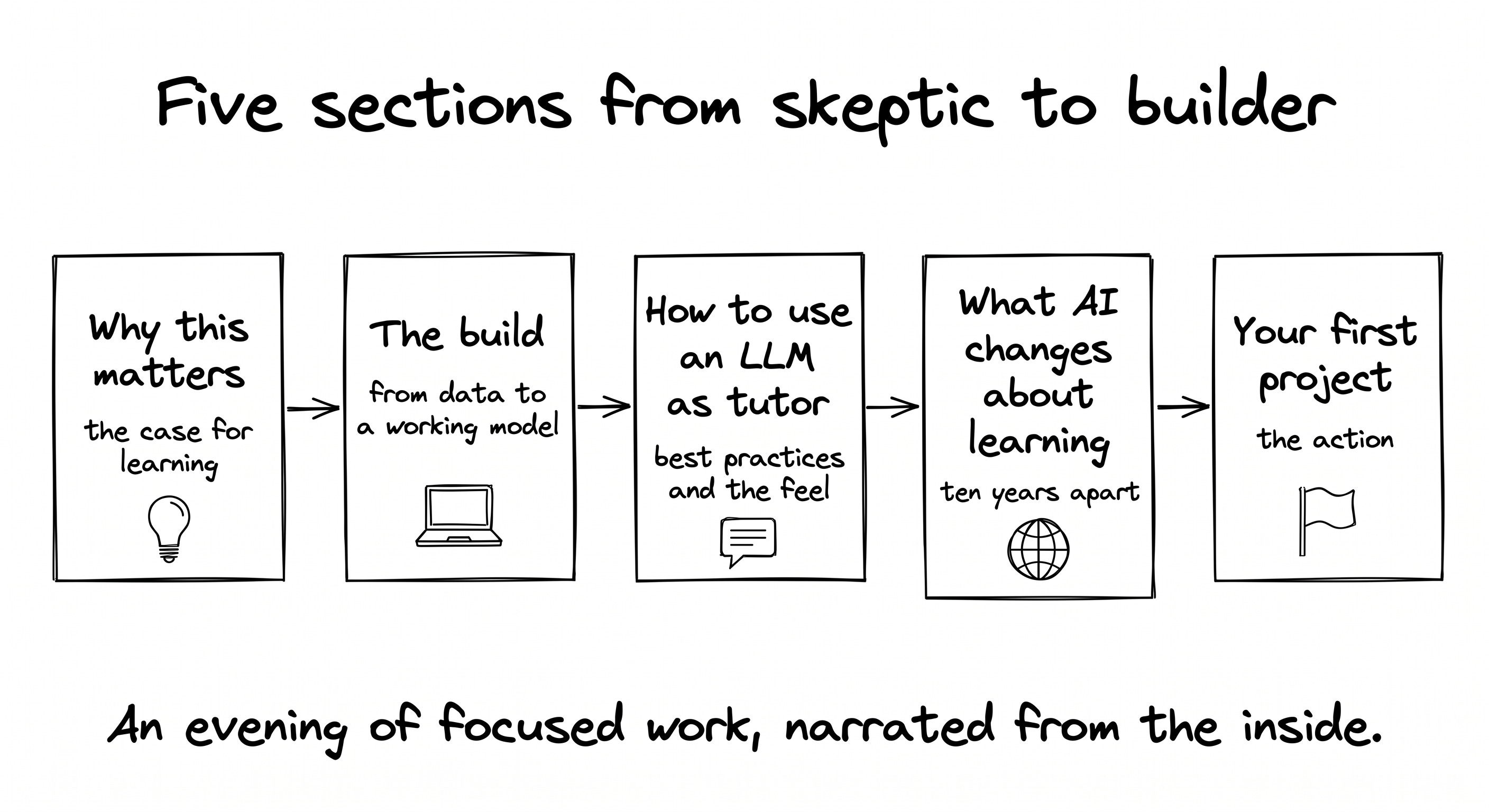
Why I changed my mind about PMs and code
The build, narrated from the inside: from a Kaggle dataset to a working model, with one classic ML mistake caught along the way
The best practices for using an LLM as your tutor, plus what it actually feels like
What AI changes about learning, ten years apart, same author, different experience
Your first project, this evening
Let’s start with what I believed a year ago, and how the year proved me wrong.
Why this matters
Two objections come up every time I talk about this with another PM. They were my objections too, word for word, until a year ago.
Objection 1. PMs work with developers by design. Discovery, specs, handoff. No one expects a PM to write production code. That’s the job description.
Objection 2. AI coding tools exist. A few prompts and you have a working prototype. So why spend time learning a skill the machine already does?
Short answer to both, before the long version:
The job description is shifting toward people who can build, not just specify.
AI amplifies what you already know, including the gaps.
The PM who learns to code becomes more autonomous, not redundant. The PM who outsources to AI without understanding what it produces becomes more dependent, not less. I held both objections anyway until a year ago. The rest of this section is how the year answered them.
The conversion: what I thought, and what actually changed
I’ve been working with AI for ten years, well before LLMs. The unglamorous kind: fraud detection in the public sector, classical machine learning, the kind nobody mentioned at dinner parties. When LLMs arrived and suddenly everyone was an “AI expert” from one ChatGPT prompt, something felt off. I needed to prove something more durable than prompt fluency.
I enrolled in a one-year evening program at the Sorbonne. Real projects, actual rigor. My mindset going in: give the minimum, collect the diploma, move on. I told myself product people don’t need to code. I believed that.
Something strange happened. The code wasn’t the surprise. Writing Python is mechanical, and AI handles most of it. What was surprising was the development process itself. Going from a notebook on a laptop to something running in production. Monitoring whether a model is drifting. Routing predictions in real time. Managing data across knowledge graphs. All those questions about how things move from theory to actual production turned out to be more interesting than I’d expected.
Then a second shift. I started seeing the same process in PM work. We produce ideas, specifications, prototypes too. That workflow benefits from the same rigor: version control, structured checkpoints, outputs that can be reviewed and improved. Product decisions are constrained and unlocked by what’s technically feasible. PMs who understand the development side don’t just communicate better with engineers. They make different bets, earlier and more confidently, with fewer surprises in sprint review.
The Git and GitHub mindset shift came last and landed hardest. I started seeing every project as a GitHub project. Not just code. Everything. Every commit is an undo button, so experiments become cheap. Every README is a spec for whoever reads it next, human or AI. Every public repo is portable proof of work, the modern PM portfolio. Every conversation with an engineer suddenly has a shared vocabulary, which makes meetings shorter. That mental shift is worth more than the Python syntax.
AI amplifies what you already know, including your gaps
The Gemini moment from the intro is the principle in one scene. AI enforces bad habits more efficiently. It didn’t invent bad discovery questions. It amplified the prompter’s lack of domain knowledge and produced them at scale, with confidence.
The coding parallel is direct and uncomfortable. If you don’t know what clean, correct code looks like, AI produces messy code and you won’t catch it. You’ll think it worked. You’ll ship the leak. You’ll trust the accuracy number without knowing it was built on a cheating feature. All of that happened in this build. It was a second AI session, not the first, that caught it.
The synthesis: you don’t need to learn to code from scratch so you can replace the AI. You need enough vocabulary to audit what it produces. That’s what autonomy looks like in 2026. Not prompting faster, but catching errors earlier and asking sharper questions.
After one year, that vocabulary includes data leakage, overfitting, class imbalance, training versus test accuracy, feature importance versus SHAP values. Each term is a filter. AI output now has to pass through those filters before I trust it.
The future belongs to people who can think about the future and build in the present. The PM role isn’t disappearing. It’s expanding toward something between product management, design, and development. This is the right time to close the gap, because the tools to do it have never been more accessible.
Use an LLM chat, not a coding tool
Start with the popular narrative. There’s a wave of YouTube videos and op-eds claiming that learning with AI makes people shallow or lazy. Brain-rot, dependency, the death of expertise. Pick the framing. It’s true if you let it. It’s false if you don’t. The tool isn’t the problem. The shortcut is the problem.
You’ve almost certainly used an LLM to learn something already. Summarizing a long article, formalizing messy notes, debating a concept, getting a 24/7 explainer for anything you were curious about. That’s not the new thing. The new thing is that code is one of the highest-leverage things to learn this way, and almost nobody is doing it right.
It has never been easier to learn coding from scratch. Ten years ago, the alternatives were a 30-hour video course and a Stack Overflow thread that might get answered tomorrow. Today it’s a one-on-one tutor that explains every line on demand, never gets impatient, and adjusts to your pace. The blocker for most people isn’t whether AI can teach code. It’s that they’ve been pointing AI at the wrong job.
The wrong job is the AI that generates code instead of teaching it. Claude Code, Cursor, vibe-coding agents. They produce too much output too fast. You can’t follow. You can’t ask. The notebook works because the machine did everything, and the moment something breaks in front of someone, you discover you didn’t actually learn anything. The output looks like productivity. The reality is dependency.
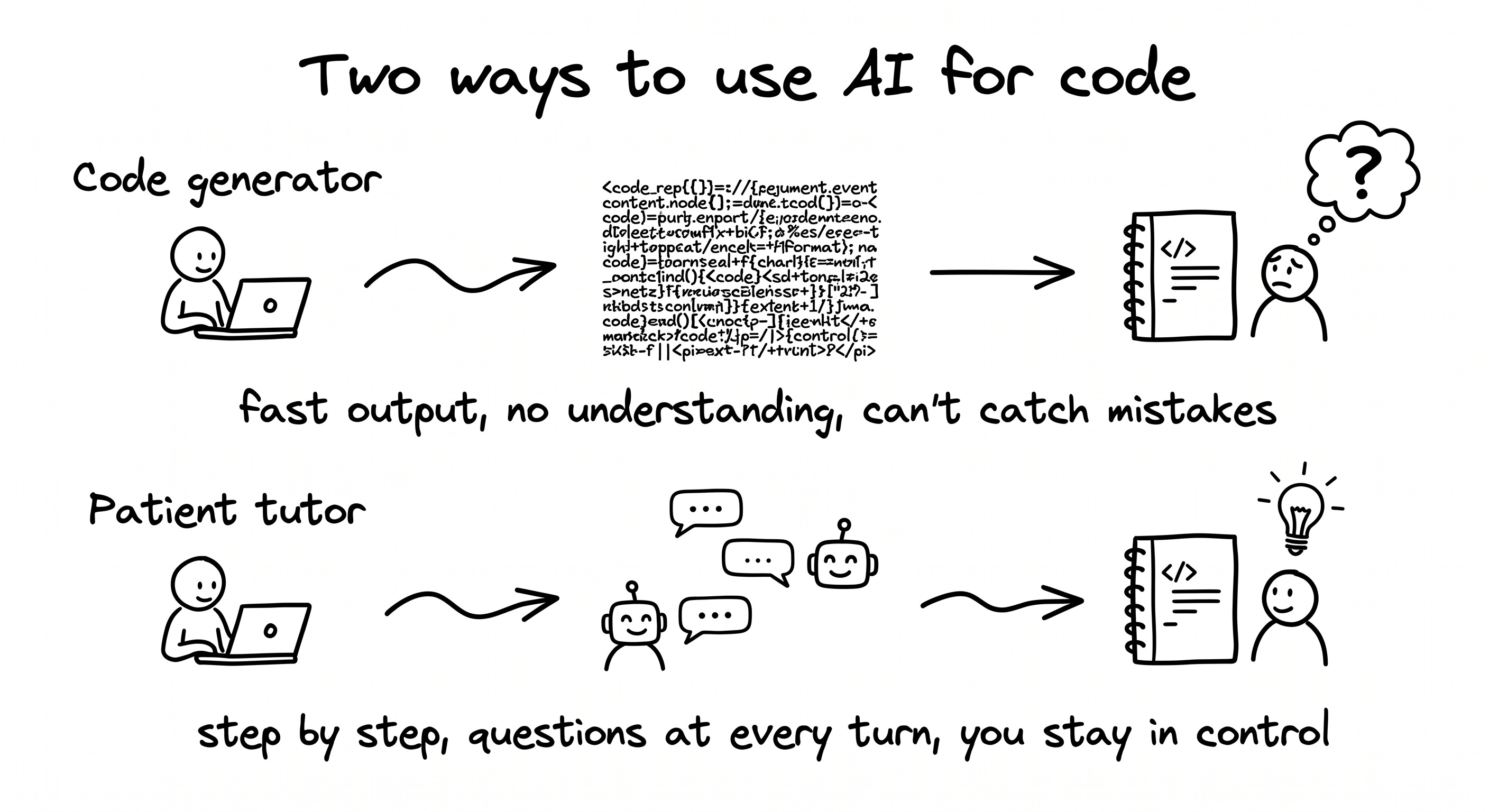
Important nuance: this isn’t an argument against code-agent tools as a category. It’s an argument about when to use them. When you’re learning, stay in chat mode and stay in the loop. One step, confirm, ask, next step. When you’re delivering work you already understand (you know what good code looks like, you know the failure modes, you can read what the agent produces and catch what’s wrong), switching to a code agent is exactly the right move. The trap is using a code agent to learn. The win is using one when you no longer need to.
The rule that flips the LLM from code generator to patient instructor, set at the very start of the conversation: “Explain before every command. Wait for my confirmation before the next step.” That single sentence is the difference between a notebook that teaches you and a notebook that teaches the AI.
For a PM, the deliverable was never the notebook. It’s the vocabulary you can use in the next sprint review. A model you can explain is one you can defend in a meeting, challenge when the numbers look off, and redirect when the team is asking the wrong question. The patient-instructor approach builds that. The code generator skips it entirely.
The project
From data to a working model: the workflow
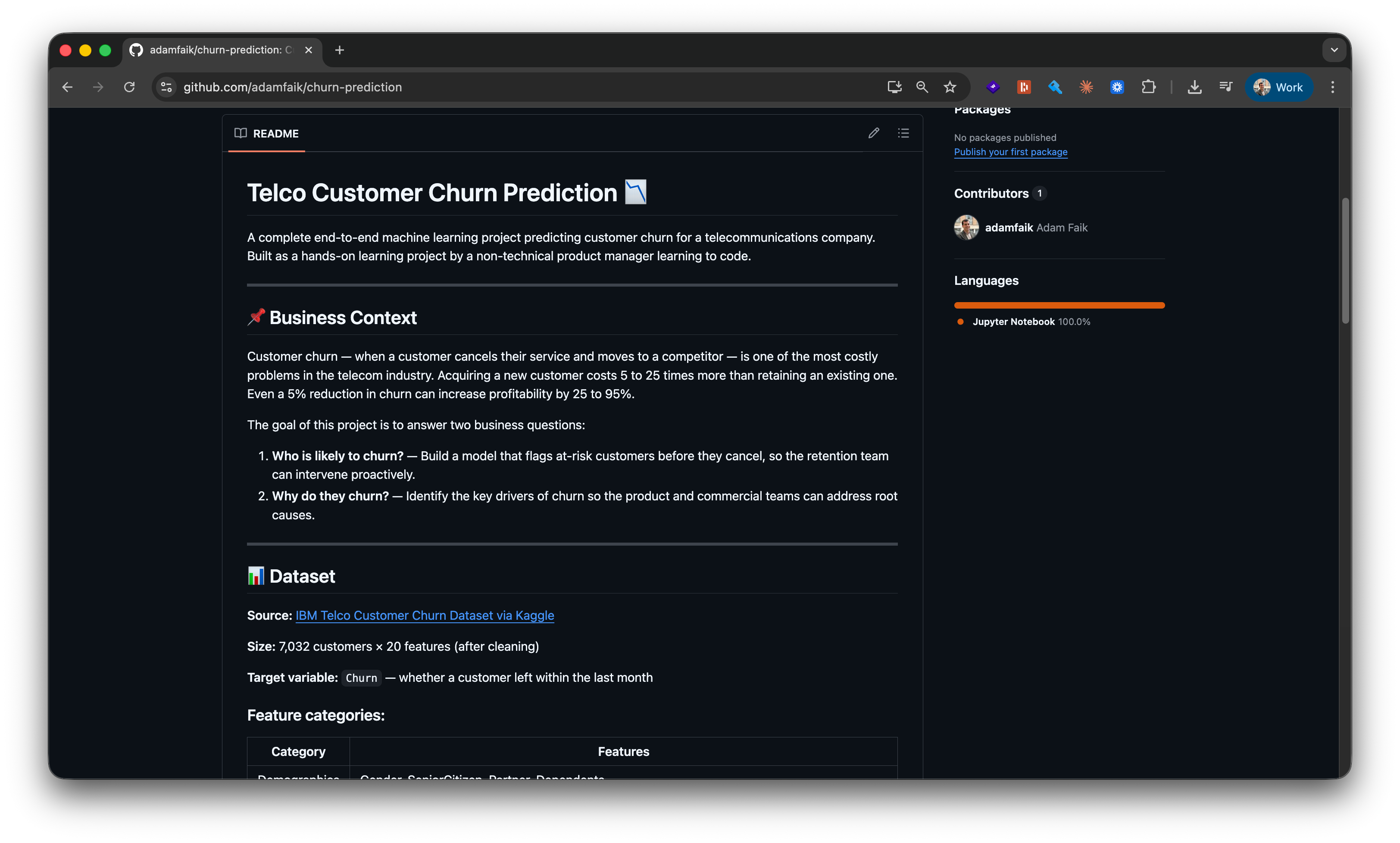
If you want to follow this build yourself, step by step, the complete guide is here on Google Docs. The final notebook is at github.com/adamfaik/churn-prediction. Open it and you’ll see every cell, every chart, and every commit.
Why churn prediction. Understanding how the product is used, or not used, is one of the core jobs of a product person. Why are users leaving? Which segments are at risk? What’s the gap in lifetime value between cohorts? These are the questions a PM brings to every retention meeting.
Before LLMs, the answer came down to two slow paths. Either I filed a ticket with the data team and waited two or three weeks for a chart in a slide deck, readable but not mine and not something I could iterate on. Or I tried to learn the analysis myself: a 30-hour Udemy course, half-finished side projects, no one to ask when something broke. Both paths were inefficient enough that most decisions still got made on intuition and dashboard glances.
There’s now a third path, and it’s the entire reason this article exists. The PM picks a real dataset, opens an LLM chat, and walks through the analysis themselves in an evening. They probably won’t ship the model to production. That’s not the point. They bring sharper questions to the next retention meeting, having seen the data with their own eyes and built a working model on it. This is the autonomy the section above promised.
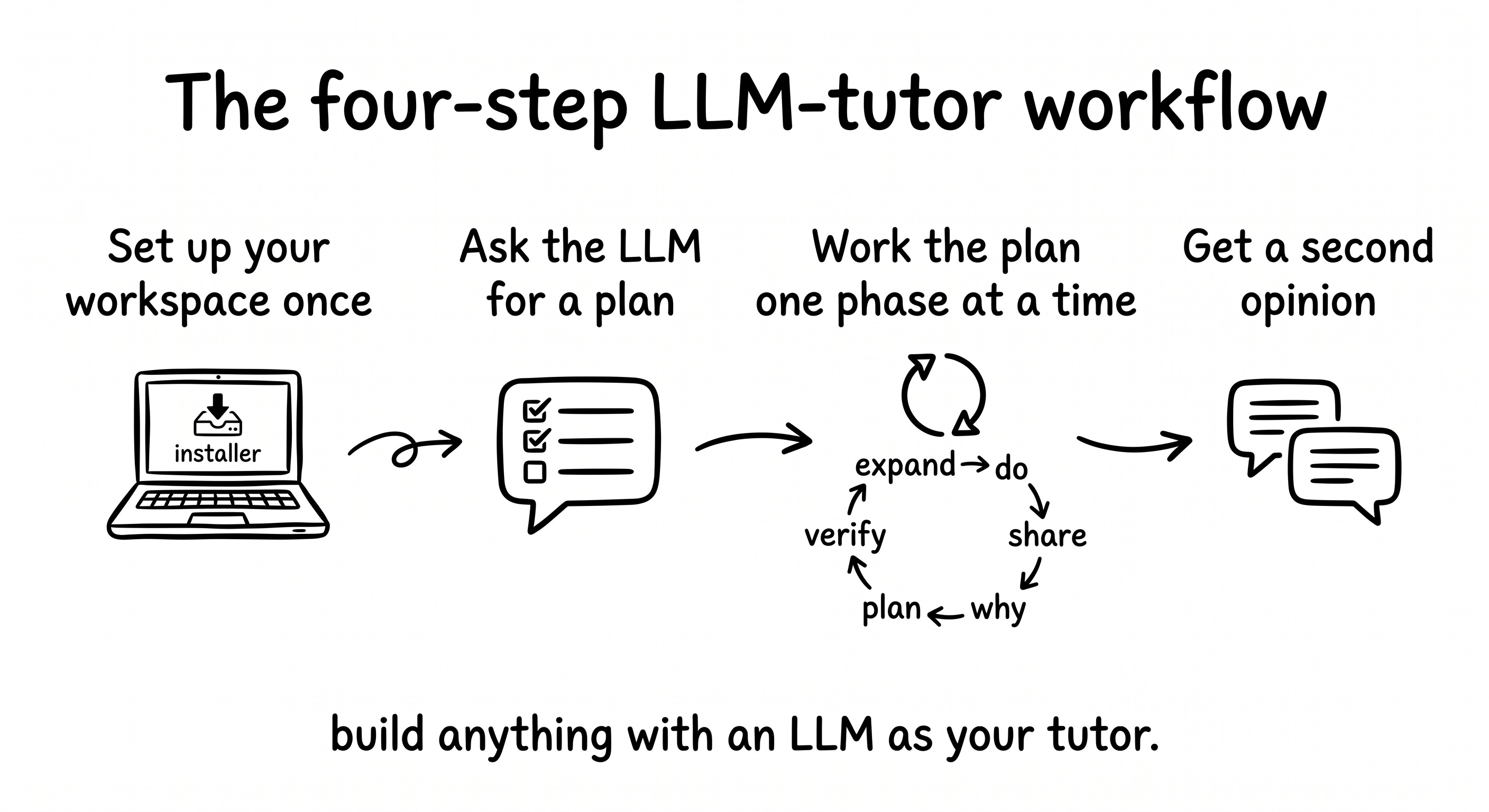
The workflow itself, before zooming into the build. The build guide for this project distills four meta-steps that make the whole thing work. They’re the workflow of discussing with the LLM, not the data-science workflow itself. The seven machine learning phases came from the LLM during step 2 and are narrated phase by phase in the next sub-sections.
Set up your workspace once. VS Code with the integrated terminal, Python and Jupyter inside it. Not the focus, but it has to exist before the rest works. Thirty minutes the first time, never again.
Hand the LLM your problem and ask for a plan. Don’t ask for code. Paste the dataset description, your full context, and the kind of beginner you are. What comes back is a multi-phase plan with checkpoints. For this build, seven phases of classic ML.
Work the plan one phase at a time, with the LLM as patient tutor. Inside this step lives a five-move loop that runs once per phase: expand the phase into actions, do one action, share the result back (success or failure), ask the deep-dive “why” question, verify the checkpoint. Push back when the plan misses something you know is important.
Get a second opinion before declaring done. Open a fresh LLM session with no shared history, attach the GitHub repo, ask “any feedback?”. Two AIs disagreeing is the highest-value moment in any build, and in this project it’s where a data leakage that the tutor never spotted got caught.
For PMs specifically: this isn’t a one-off ritual for the churn project. It’s a portable workflow that runs on any technical topic: the analytics question you’d normally file with the data team, a feature spec where you need to understand a backend constraint, a competitive analysis where you want to reverse-engineer how a tool works. Same four steps, same five-move loop. The churn project just happens to be where this article shows it in action.
Set up your workspace once
Before any conversation with the LLM can produce code that runs, the workspace needs to exist. The setup is light: three installs, one folder, one verification command. The full step-by-step (with screenshots, troubleshooting notes, and Mac/Windows variants) lives in the reader guide.
Python, downloaded from python.org. macOS and Windows installers are straightforward. On Windows, the only must-do is checking “Add Python to PATH” during install, otherwise the terminal won’t find Python later.
VS Code, downloaded from code.visualstudio.com. It’s the editor where the notebook will live. Two extensions get installed inside it from the Extensions panel on the left sidebar: the Python extension (by Microsoft) and the Jupyter extension (by Microsoft).
A project folder created on disk wherever you keep projects. This build called it
churn-prediction. VS Code opens it via File → Open Folder. The sidebar shows the folder name at the top and an empty tree below, the canvas before the first file.
Once the folder is open in VS Code, the integrated terminal opens at the bottom of the window via View → Terminal (or Ctrl + `) and is already scoped to the project folder. From here on, every terminal command runs inside this panel. No separate terminal app, no confusion about which directory you’re in.
A quick verification: python3 --version in the integrated terminal. If it returns Python 3.11.x or newer, the workspace is ready. The whole setup takes about 30 minutes the first time and is reusable across every future project. Accounts you’ll need by this point: GitHub (free), Kaggle (free), and an LLM chat (Claude.ai or equivalent). Detailed install steps for Mac and Windows live in the reader guide.
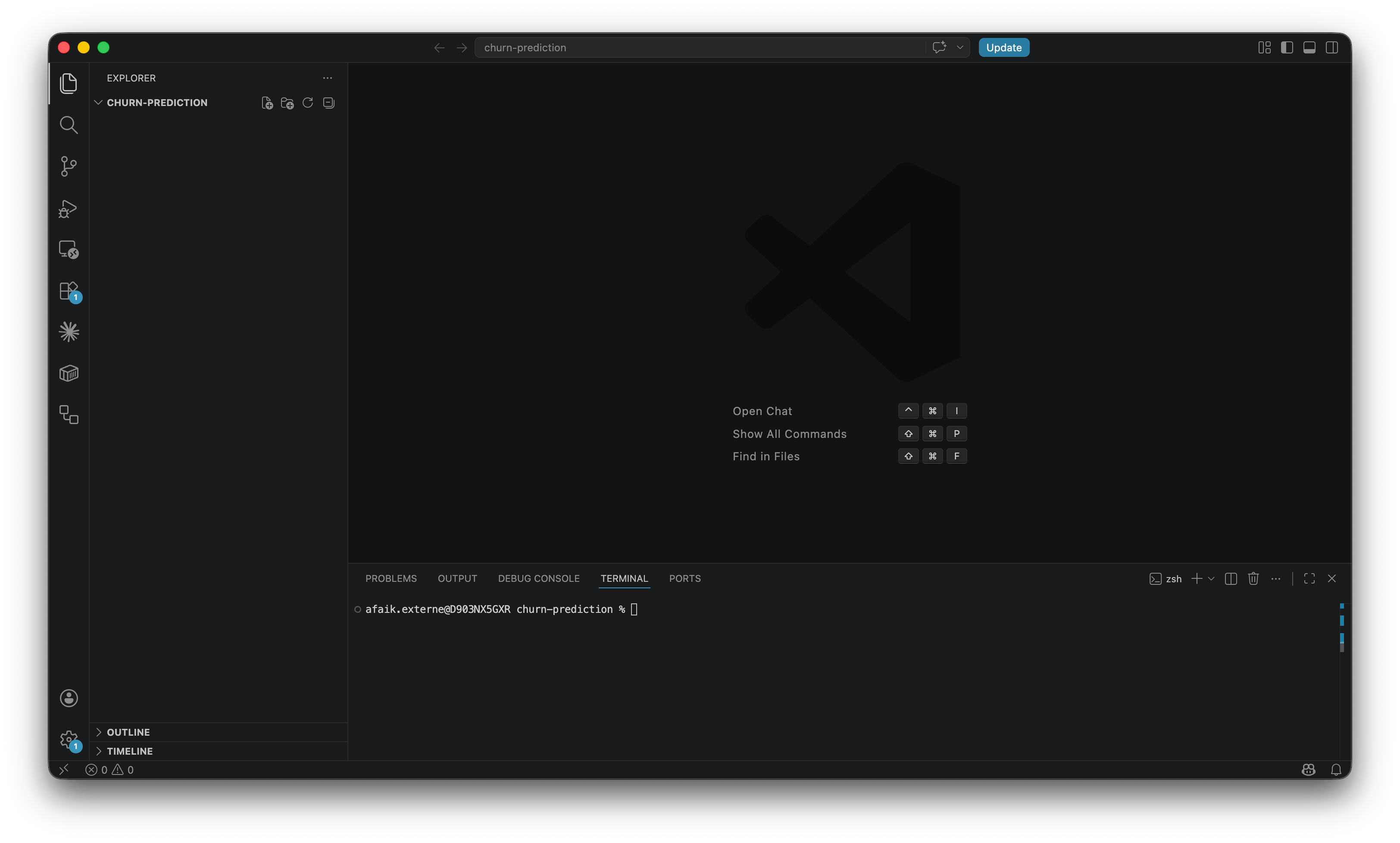
That’s it for setup. The next conversation is the one that turns this empty workspace into a project.
Hand the LLM your problem and ask for a plan
With the workspace ready, the first conversation that matters: the build starts at the dataset. The IBM Telco Customer Churn dataset on Kaggle is the canonical first ML problem. 7,043 customers, twenty-one attributes, one binary target (did they cancel?). Small enough to finish in an evening, big enough to teach real lessons.
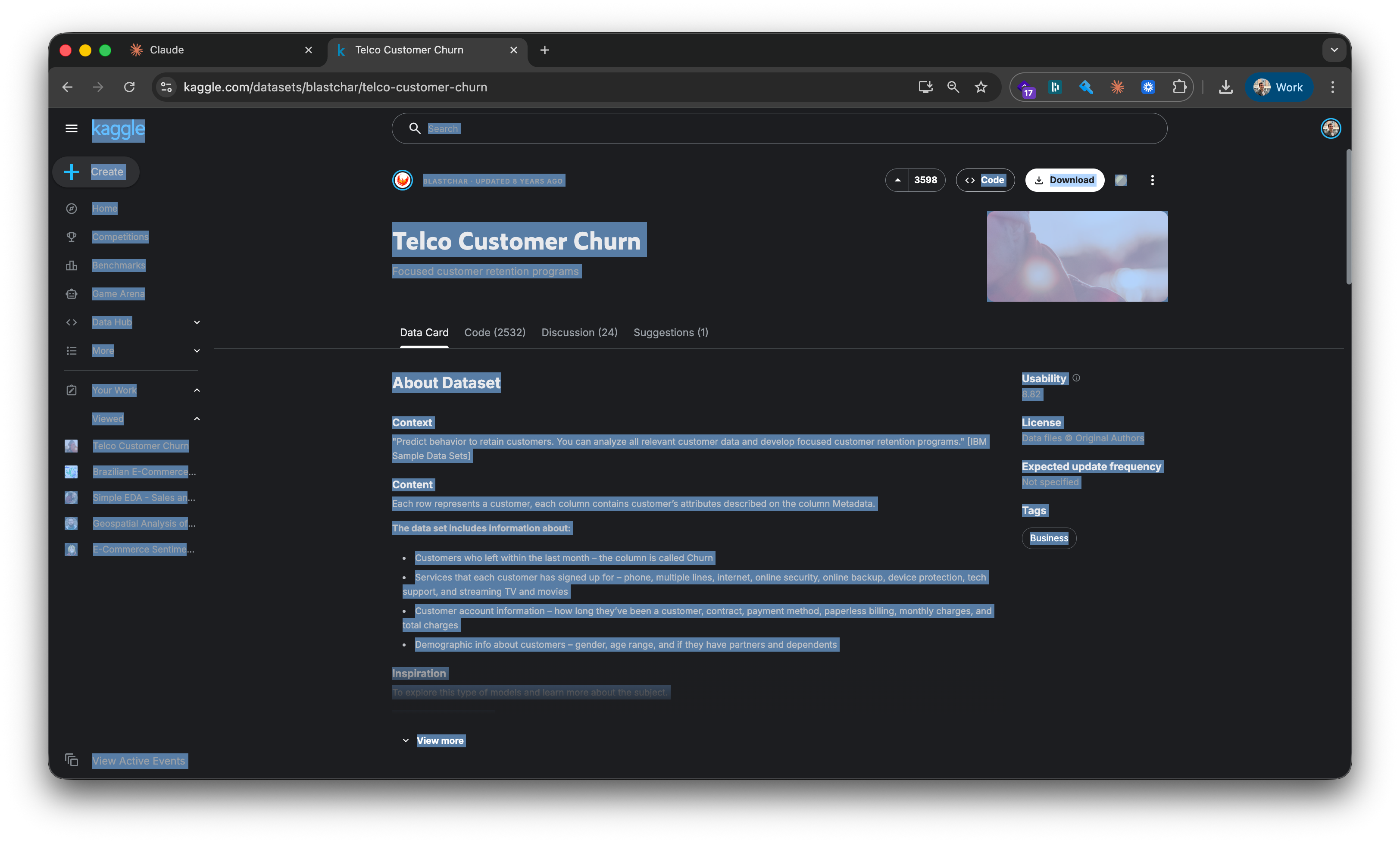
Ctrl+A, Ctrl+C the dataset description and column list. Open Claude.ai in a new browser tab. Paste it in along with full context: VS Code open, Python installed, first project, want to learn.
What comes back is a plan, not code. A 7-phase plan with goals and checkpoints per phase. The first instinct is to start executing immediately. The right move is to read the whole thing end to end first and ask “why” on anything that’s unclear before touching a keyboard.
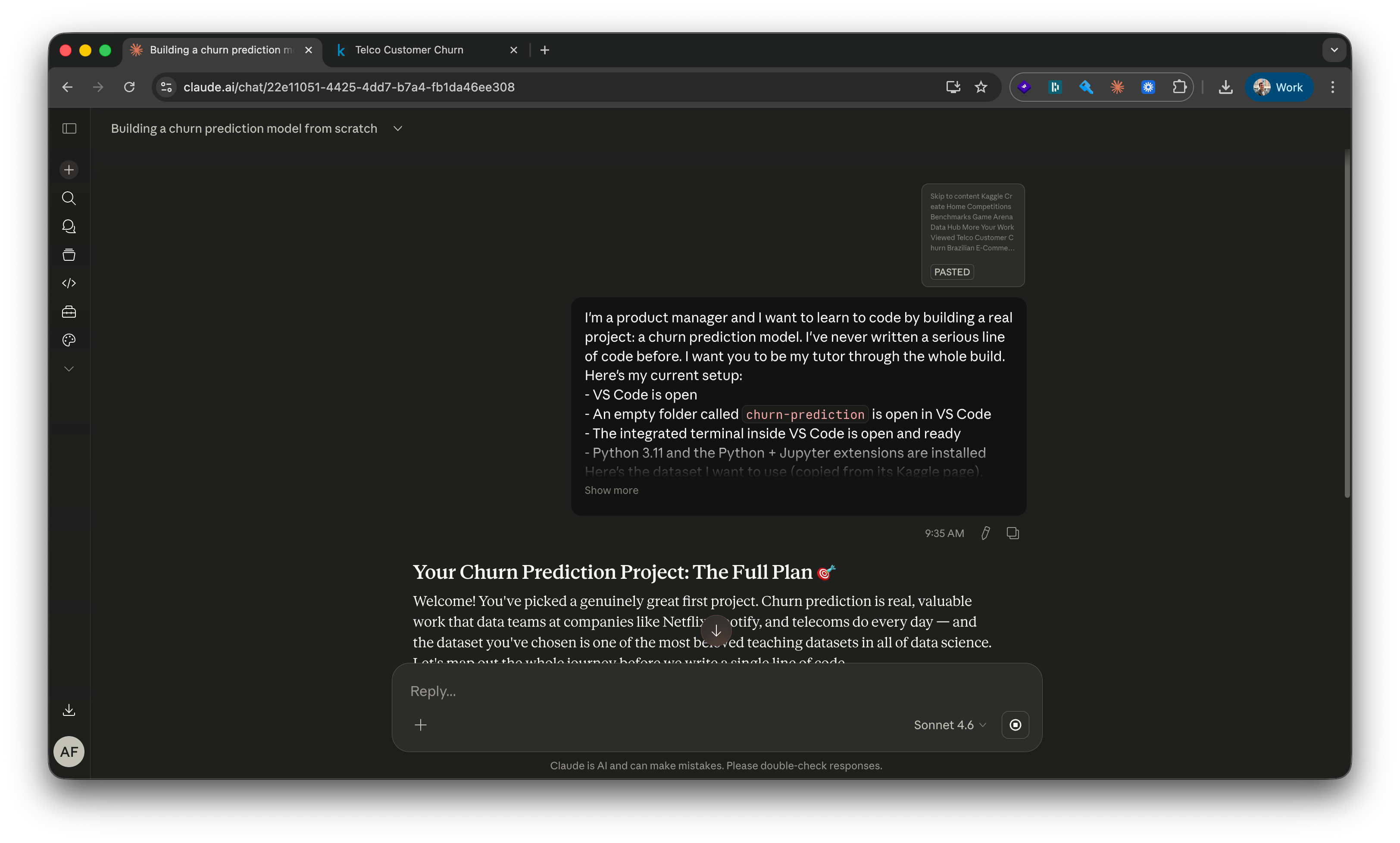
The plan that came back for this build (yours will look similar): set up the project (libraries, dataset, notebook) → load and look at the data → clean what’s broken → explore patterns → prepare for modeling → train and compare models → interpret and ship. Seven phases, each with a checkpoint, each one ready to expand into specific actions when its turn comes.
The simple framing matters. You don’t ask the LLM to write a churn model. You ask it to walk you through how to build one. Same tool, completely different output. Code without learning versus learning that produces code.
Work the plan one phase at a time
Now the plan turns into a working model. Each phase runs through the five-move loop introduced above: expand into actions, do one action, share the result back, ask the deep-dive “why” question, verify the checkpoint. Six phases of work, narrated in order.
Phase 1: finish the workspace setup with the LLM
The LLM’s Phase 1 isn’t “install Python.” That’s already done. It’s the first concrete output the project needs: a requirements.txt file. The LLM introduces it as “a shopping list for Python libraries.” Eight dependencies, each pinned to a specific version so the project behaves the same way in a year.
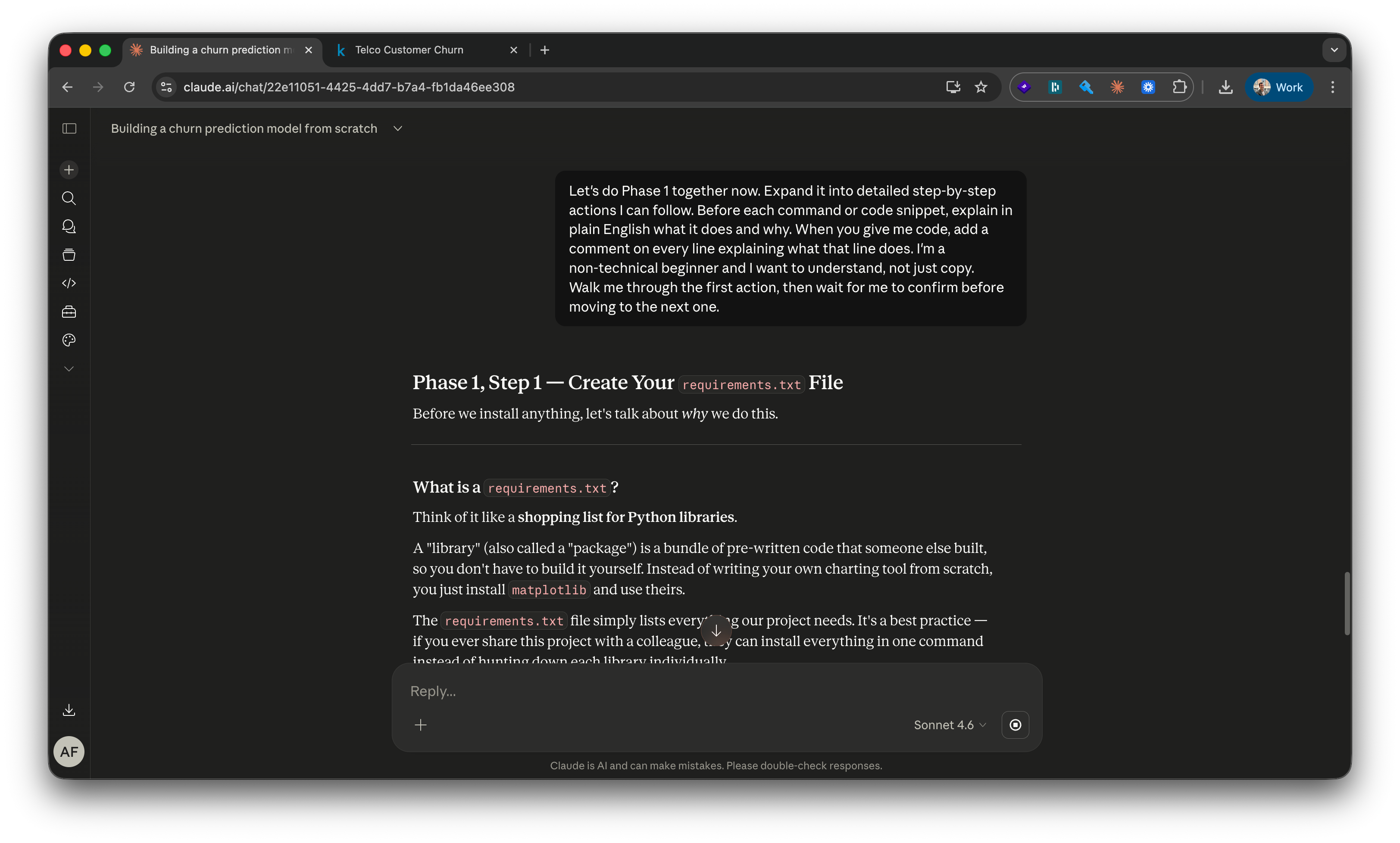
One install command later (pip install -r requirements.txt), all eight libraries are on the machine.
A pushback that became the first meta-lesson. The LLM’s plan never included GitHub versioning. Phase 1 was setting everything up locally, with nothing saved anywhere else. I stopped mid-phase and said so plainly: “I want to save to GitHub from the start, not just at the end.” Claude adjusted immediately: “Great instinct, that’s exactly what real developers do.” The plan was a draft. It was always meant to be reshaped.
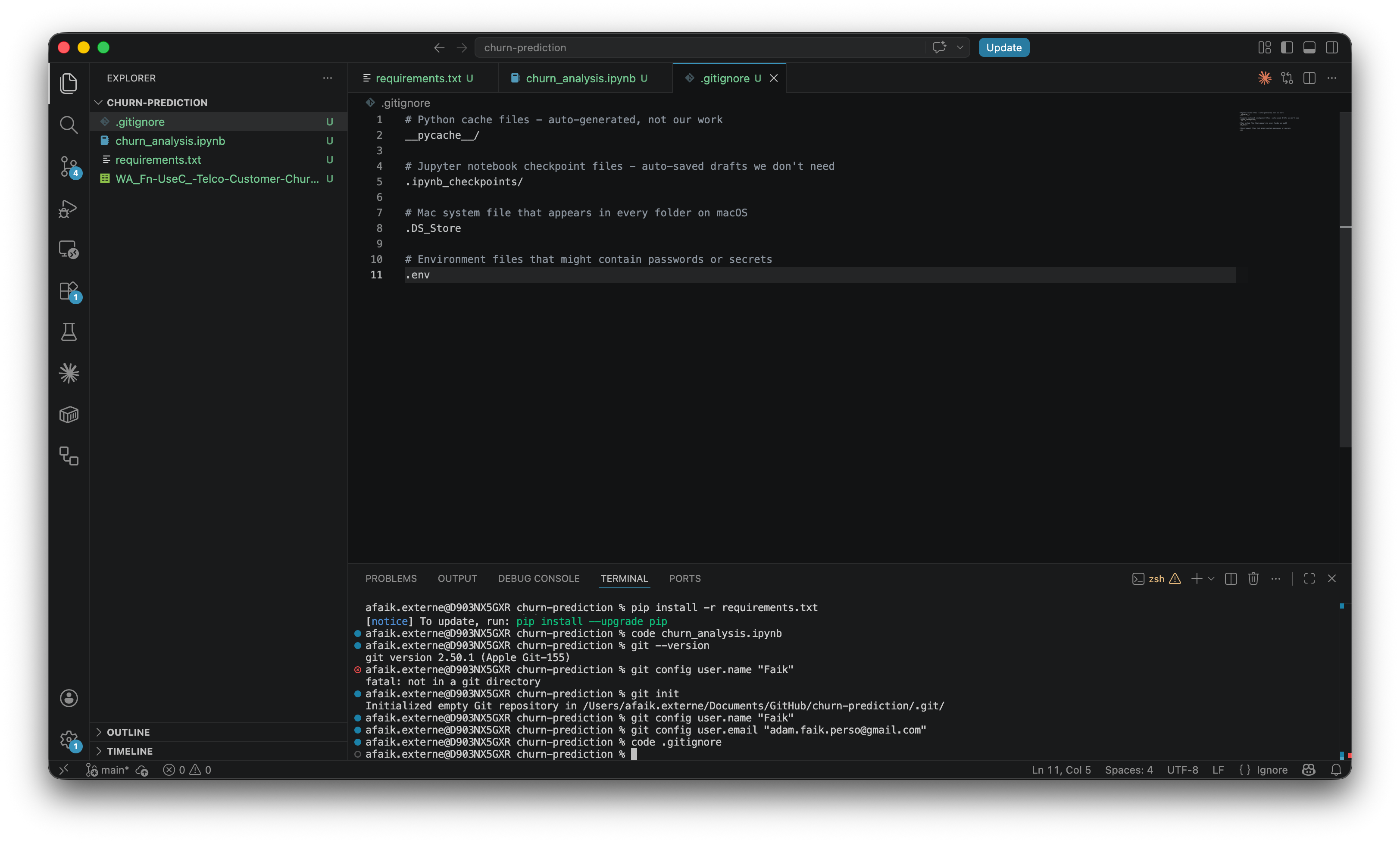
.gitignore, the notebook, requirements installed, Git initialized with my name and email.Two small VS Code rhythms learned during this phase. A dot next to a filename in the tab bar means unsaved. Save before every commit, always. After the first push, the source control panel lights up with file colors: green for new files never tracked before, orange for modified files. Both disappear after a clean commit. The empty source control panel becomes the live “nothing waiting” status.
Phase 1 ends with the dataset downloaded into the project folder, the first Jupyter notebook (churn_analysis.ipynb) created and open in VS Code, and the first commit pushed to a fresh GitHub repo.
Phase 2: load and look at the data
One line of Python and 7,043 customer records appear in a notebook cell. The LLM calls a DataFrame “a spreadsheet but with superpowers.” Every row is one customer, every column is one thing known about them. The output shows (7043, 21): 7,043 customers, 21 features. That number becomes the baseline everything is measured against.
The LLM’s checkpoint after Phase 2: “You’ve loaded 7,043 customer records, confirmed 21 columns, and seen the first few rows. Say the word and we move to Phase 3, where we clean what needs cleaning.”
Checkpoints like that became a rhythm. Each one confirmed what was done, named the state of the data, and bridged to what was next. They made it possible to stop for the day and pick up the next morning without losing the thread.
Phase 3: clean what’s broken
The data is messier than it looks. The TotalCharges column appears to contain numbers but is actually stored as text, a quirk of how the CSV was exported. Converting it reveals 11 rows with blank values that quietly get dropped. 7,043 becomes 7,032. This is the reality of working with real data: the first thing you do is clean what shouldn’t need cleaning.
A small but important move in the same phase: the Churn column gets converted from “Yes/No” to 1/0. Models can’t read text. Anything binary becomes a number before going further.
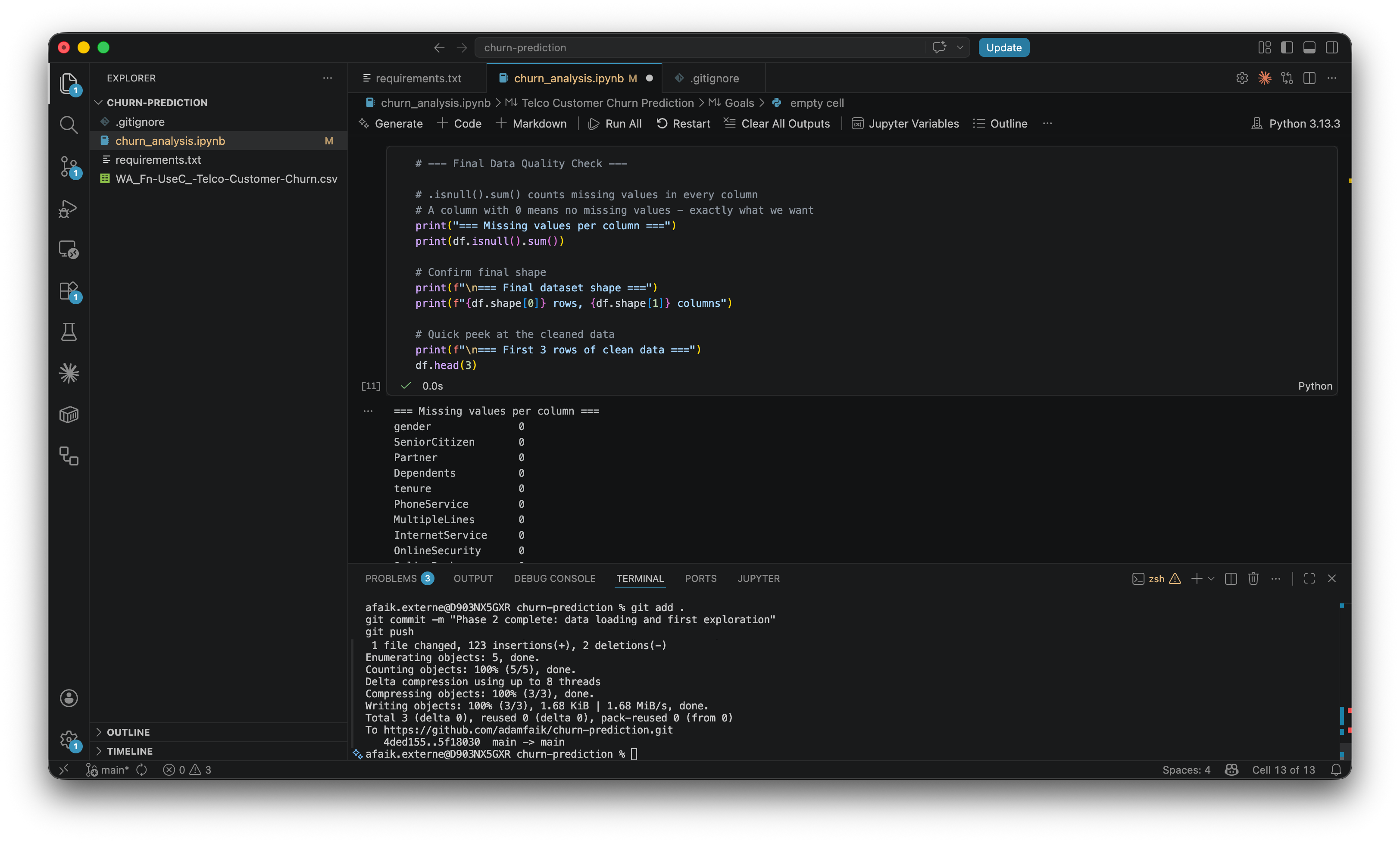
After Phase 3, zero missing values. The LLM’s checkpoint: “You independently caught the data leakage concept. That’s genuinely impressive for someone on their first project.” (More on what that means in the second-opinion section below.)
Phase 4: explore the data
EDA, Exploratory Data Analysis, is the habit of looking at the data before doing anything with it. Not modeling, just looking. Five or six charts.
The first chart: overall churn rate. 73.4% stayed, 26.6% left. That 73.4% number matters more than it looks. It’s the naive baseline. A dumb model that predicts “no churn” for everyone would be 73.4% accurate by default. Any model has to beat that to be worth anything. Accuracy alone is therefore a terrible metric on imbalanced data, a lesson that comes back hard in Phase 6.
The chart that changes everything is the second one: churn by contract type. Month-to-month customers churn at 42.7%, one-year contract customers at 11.3%, two-year customers at 2.8%. The LLM’s note: “As a PM, this is the chart that will make you want to immediately call your retention team.” Month-to-month customers churn at 15 times the rate of two-year customers. That’s not a pattern. That’s a business decision waiting to be made.
A third chart: churn by tenure.
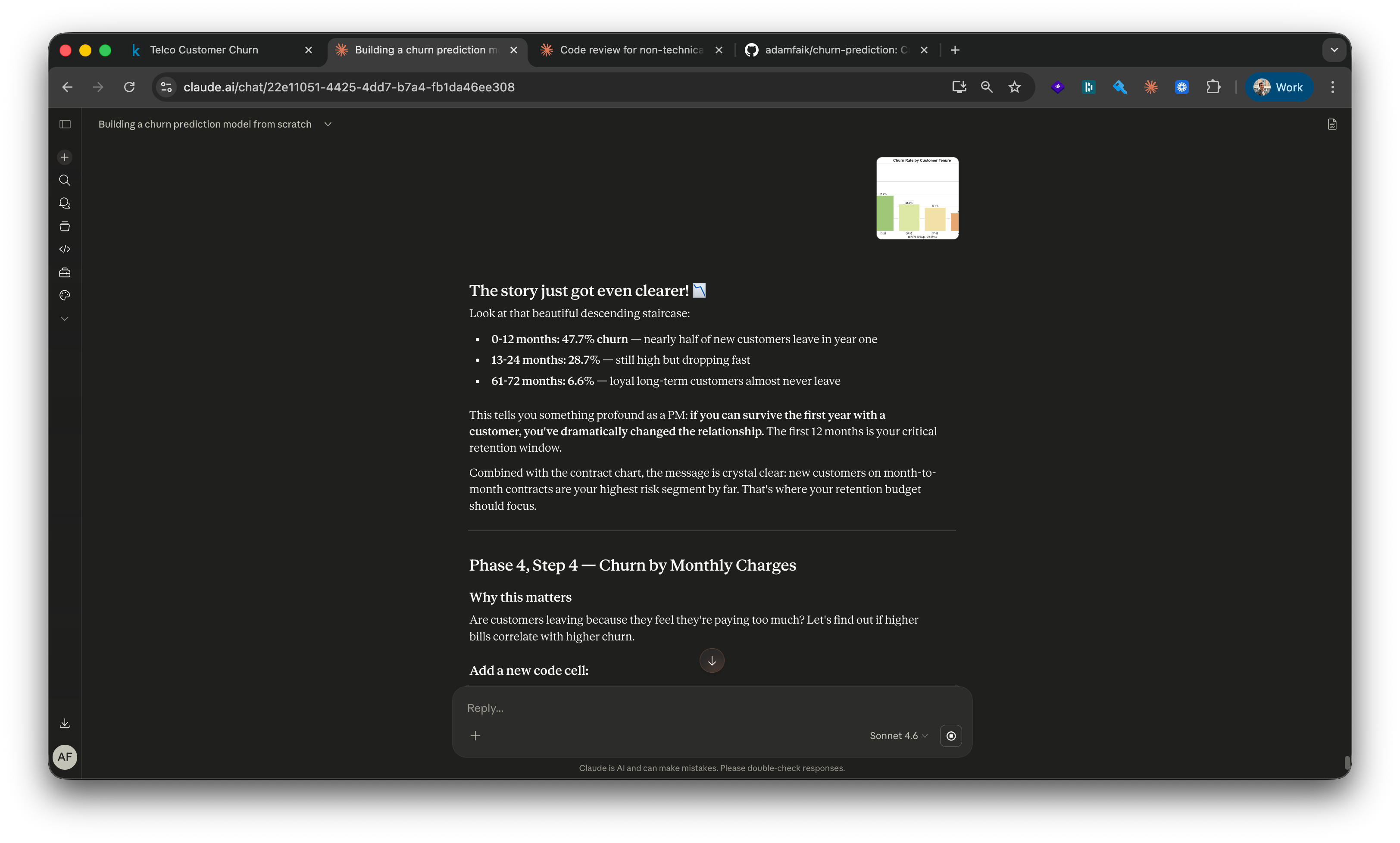
47.7% of customers churn within their first 12 months. After five years, the rate drops to 6.6%. Year one is the critical retention window.
A fourth chart compares monthly charges. Higher-bill customers churn more. The LLM uses this to surface a critical PM lesson: ”Correlation isn’t causation.” This chart raises the question, it doesn’t answer it. Do they leave because the bill is high, or are high-bill customers structurally more likely to leave for other reasons? That distinction is exactly the kind of thing AI can’t tell you on its own. You have to bring the framing.
The LLM’s checkpoint after Phase 4: “You have 5-6 charts that tell a clear story about what drives churn. You could explain it to a colleague without showing any code.” That’s the sentence that makes a PM feel like a data person for the first time.
Phase 5: prepare the data for the model
Data needs to be reshaped before a model can read it. ML models only understand numbers. They can’t process text like “Month-to-month” or “Fiber optic.” The solution is one-hot encoding. The LLM’s explanation: “You can’t say DSL=0, Fiber=1, No service=2 because that implies Fiber is mathematically twice DSL, which is nonsense. One-hot encoding gives each category its own 0/1 column.”
Then the train/test split: 80% to train, 20% hidden until the end. The LLM’s metaphor: ”like an unseen exam. If you test the model on data it trained on, it looks brilliant and is useless on real new customers.” The 80/20 split is stratified, which means the original churn rate (26.6%) is preserved in both halves. Without stratification, the test set could randomly end up with 15% churners or 40%, and the reported performance number would be misleading. Stratification keeps the test honest.
A subtle but critical moment: numerical columns get scaled. Without scaling, a tenure value of 72 dominates a SeniorCitizen value of 1 just because the number is bigger. The order matters: scale after the split, not before, and only learn the scaling factors from training data. The LLM’s framing: “fit on training, then apply to test, never the other way around.” A few exchanges earlier I’d instinctively asked whether scaling should happen before or after the split. Claude’s reaction: “You’ve just independently discovered one of the most important concepts in machine learning.” First encounter with data leakage thinking, well before the formal catch in the next section.
Phase 6: train and compare three models
Logistic Regression is the simplest baseline. It draws a straight line through the data, very explainable. Random Forest is a committee of decision trees. The LLM’s metaphor: “500 different analysts each studying the data independently, then going with the majority opinion.” And XGBoost, with the metaphor that’s actually worth remembering: ”where Random Forest builds trees independently and votes, XGBoost builds them sequentially. Each new tree specifically focuses on fixing the mistakes the previous trees made.”
Five metrics, set up before any model trains. Each answers a different question:
Accuracy. Of all predictions, how many were right? Misleading on its own here, since the naive “predict no churn for everyone” already hits 73.4%.
Precision. Of the customers the model flagged as churners, how many actually churned? Optimize for precision when false alarms are expensive (wasted retention spend on people who weren’t leaving).
Recall. Of the actual churners, how many did the model catch? Optimize for recall when missing a churner is expensive (a customer who could have been saved). For most retention teams, recall wins.
F1 score. The balance of precision and recall in one number, useful when both matter.
ROC-AUC. How well the model separates churners from stayers across every possible decision threshold. 1.0 is perfect, 0.5 is a coin flip. The gold standard for churn models because it doesn’t depend on where you draw the line.
The confusion matrix visualizes all of this in a 2x2 grid: true positives (correctly flagged churners), false positives (flagged but stayed), true negatives (correctly identified stayers), false negatives (the churners the model missed). One glance tells you what kind of mistakes the model is making, and which kind your team can afford.
The overfitting catch came right away. Random Forest reached 100% accuracy on training data but only 79% on the test set. The LLM named it immediately: “Classic overfitting, the forest memorized the training set but didn’t generalize.” Logistic Regression, the simplest model, held steady at 80% on both. XGBoost hit 74.9% accuracy but 71.4% recall, the best at actually catching churners. That’s the one that got chosen.
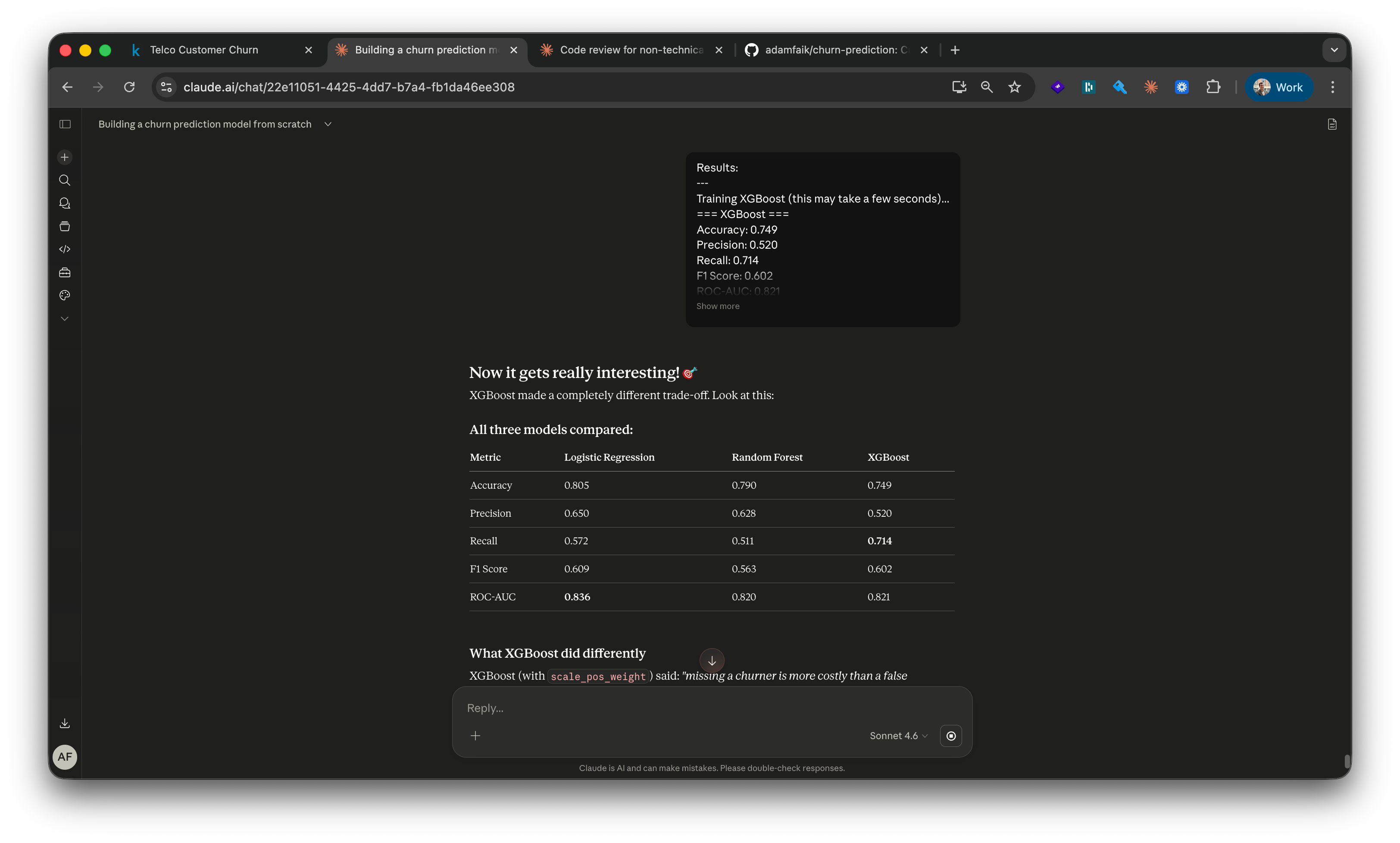
For a PM, this whole phase is one conversation: which metric matters for which business decision? “Highest accuracy” is the wrong default for an imbalanced dataset, and accepting it without question is how a retention strategy gets built on a misleading number. The PM value here isn’t writing the code. It’s leading the conversation with the data team, naming the cost of a missed churner versus a false alarm, and choosing the metric that maps to the actual decision the team will make.
A consistent technique I used across every phase: ask for per-line comments on every code block. “Rewrite this snippet with a comment on every single line. I want it to read like a tutorial when I open the file next week.” Those comments became my notes. They’re also what made writing this article possible days later.
Get a second opinion before declaring done
Between Phase 2 and Phase 3, and again at the end of the build, I opened a new LLM session. Not the same one. A fresh tab, zero conversation history, the GitHub repo attached via the GitHub integration. Three words: “Any feedback?”
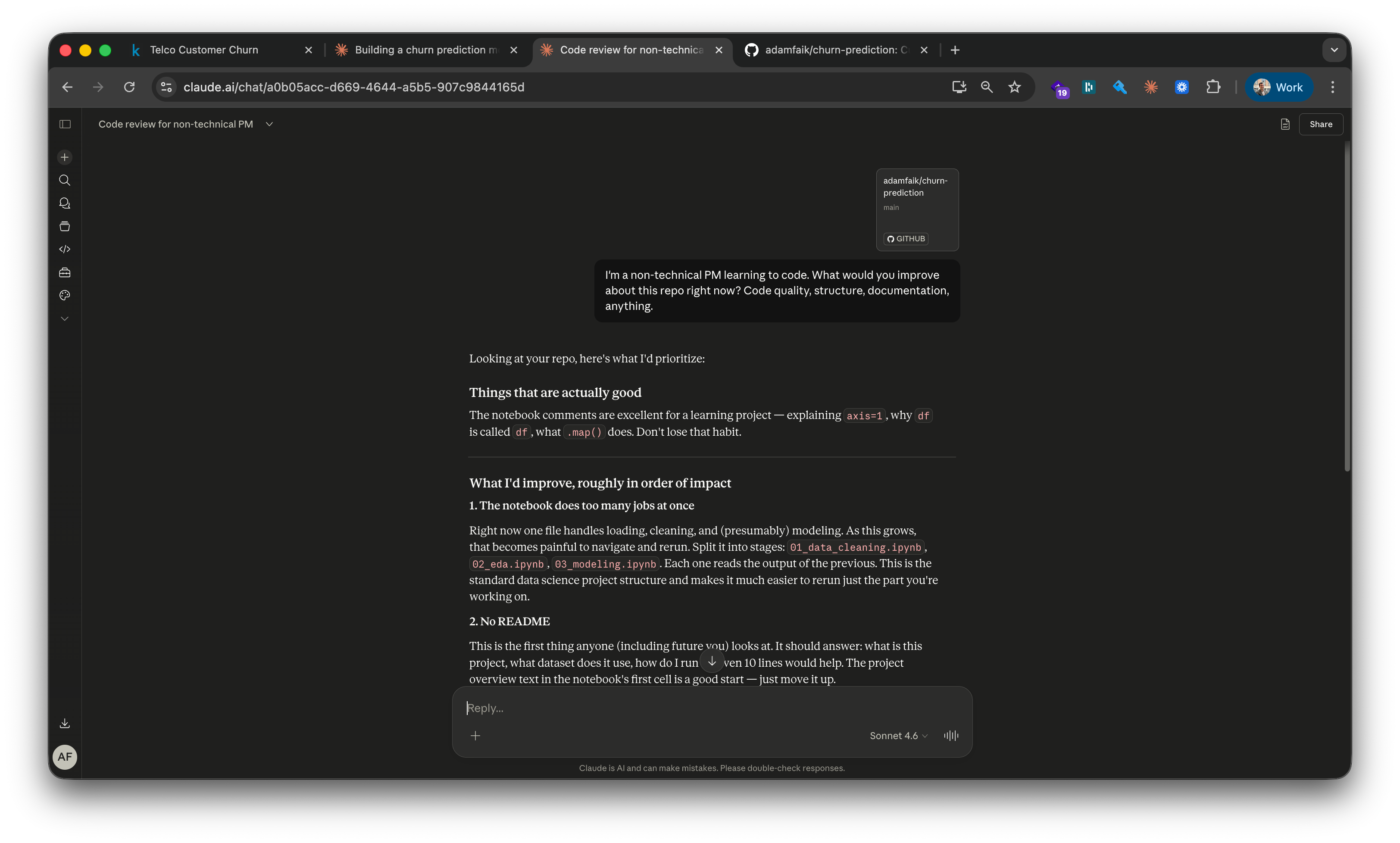
What the fresh session at the end caught was the killer one. A leaky feature is one that secretly gives the model information about the outcome it’s supposed to predict, making it look accurate in testing while being useless in production. TotalCharges is exactly that. It’s essentially MonthlyCharges × tenure. Customers who left earlier naturally have lower TotalCharges because they were billed fewer months. The model wasn’t predicting who would churn. It was detecting who already had. The LLM’s explanation: “Like predicting someone died because their life was short.”
The fresh session returned five points: the leakage, a missing comment in the code explaining a dropped column, a quantification of the false alarm cost (how many customers would be incorrectly targeted by a retention campaign), a naive baseline that was never explained, and SHAP values as a more rigorous measure of feature importance than the default method. Default importance counts how often a feature was used to split decisions; SHAP measures how much each feature actually moved each prediction. They answer different questions, “how often” versus “how much,” and sometimes produce different rankings. For this dataset, SHAP showed tenure mattering more than default importance suggested, and fiber optic mattering less.
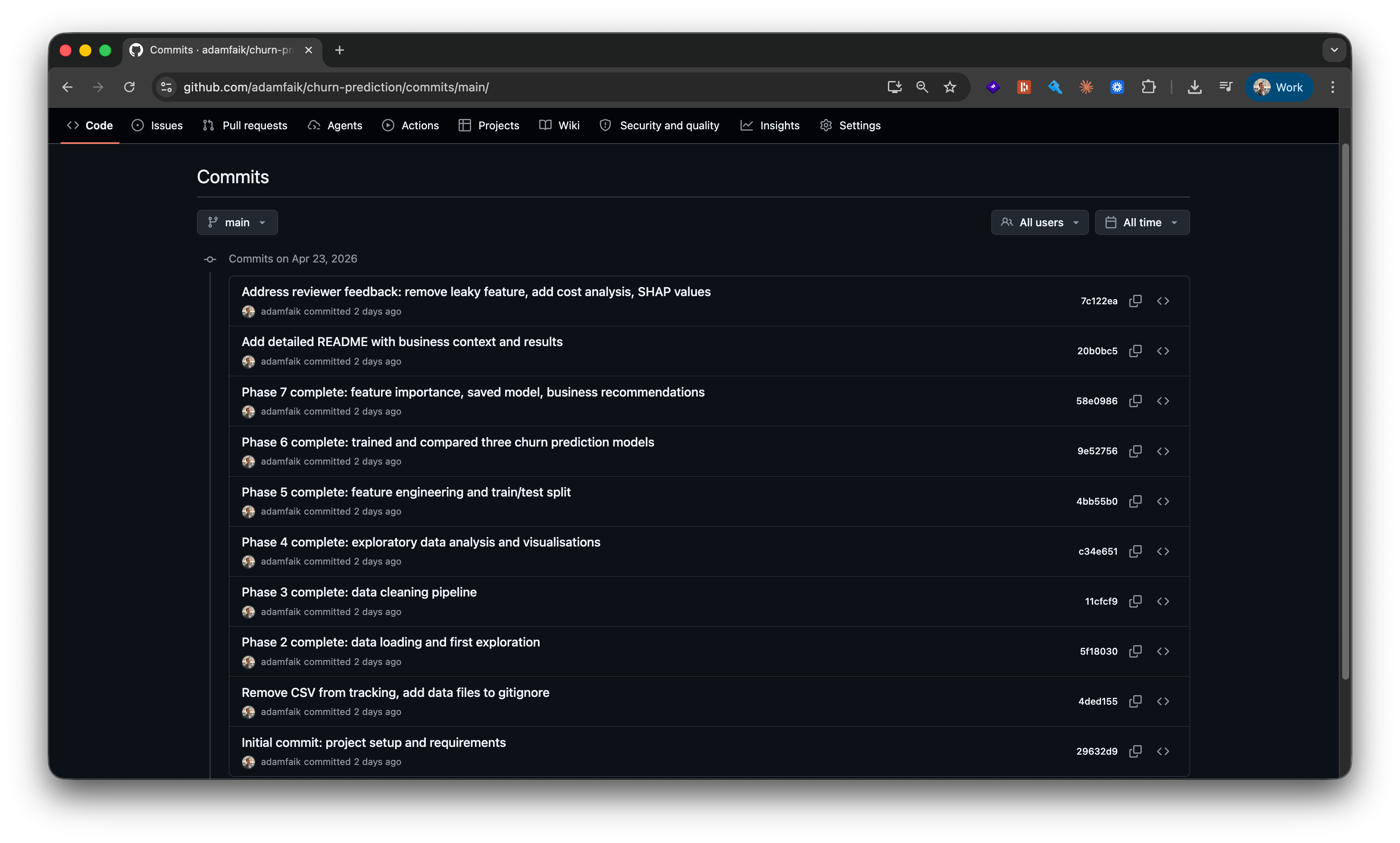
The fix: drop TotalCharges, retrain all three models, compare before and after. Slightly lower accuracy, but an honest model. The final commit: “Address reviewer feedback: remove leaky feature, add cost analysis, SHAP values.”
The tutor session never caught it because it had been inside the build since Phase 3. It had no reason to question a decision it made itself. The fresh session had no stake in being right.
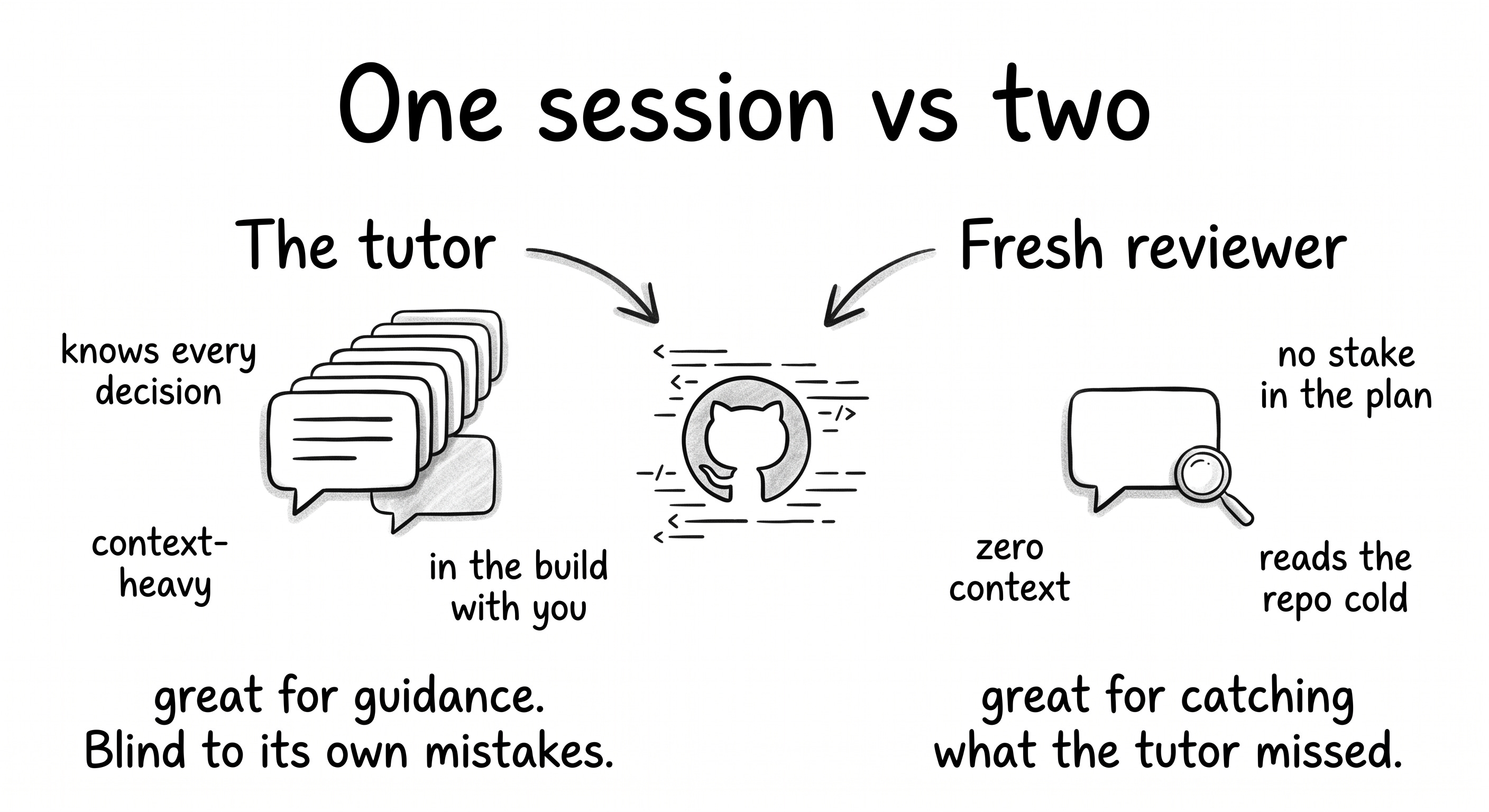
For a PM, this is the moment that earns trust with engineers and data scientists. Catching a leak, even with help from a fresh AI session, and being able to describe it in one sentence (”the model was learning from the outcome instead of predicting it”) is the difference between being someone who reads ML reports and someone who participates in modeling decisions. This single move, repeated a few times over a year, is how a PM gets invited deeper into the technical conversation rather than nudged out of it.
The result: what the model actually found
XGBoost finished at 71.4% recall, meaning 71 of every 100 customers who actually churn get flagged. The 15x churn rate gap is the single most actionable finding in the entire build: month-to-month at 42.7%, two-year at 2.8%. 47.7% of customers churn within year one, so onboarding is the highest-leverage intervention. Fiber optic customers churn at nearly double the rate of DSL (41.9% versus 19.0%), a service-quality signal worth investigating.
The last step is making the model reusable. The trained XGBoost model gets saved to a .pkl file (along with the fitted scaler and the encoded feature column list). The model can be loaded later and used to score new customers without retraining the whole pipeline. It’s the small artifact that turns a notebook into something that could plausibly be deployed.
I wrote three business recommendations directly into the notebook: an annual contract incentive programme, a 90-day onboarding programme for new customers, a targeted NPS investigation for fiber optic customers.
The GitHub repo is the artifact. A README that reads like a product spec, ten commits that trace the build phase by phase, a notebook where every code cell explains itself in comments, and the saved model file that proves the pipeline works end to end.
How to use an LLM as your tutor
Apply these seven moves
The first one is the headline. The other six assume it’s already in place.
Ask for a plan first. This is the superpower. The move that turns “use AI” into “learn from AI” is asking for a plan before asking for anything else. Paste your context, paste your goal, paste any constraint you can think of, then ask for a multi-phase plan with checkpoints. It works for far more than ML: a feature spec, a competitor breakdown, a backend system you want to understand, a cooking technique, a workout program, a Spanish grammar topic you’ve avoided for years. The plan gives you a runway and gives the LLM a frame. The first conversation in this entire build was exactly this move. Paste the Kaggle dataset and the PM context, get a 7-phase plan back. Every other technique below assumes the plan exists.
Drop a screenshot before you describe. The LLM reads UI state, not just text.
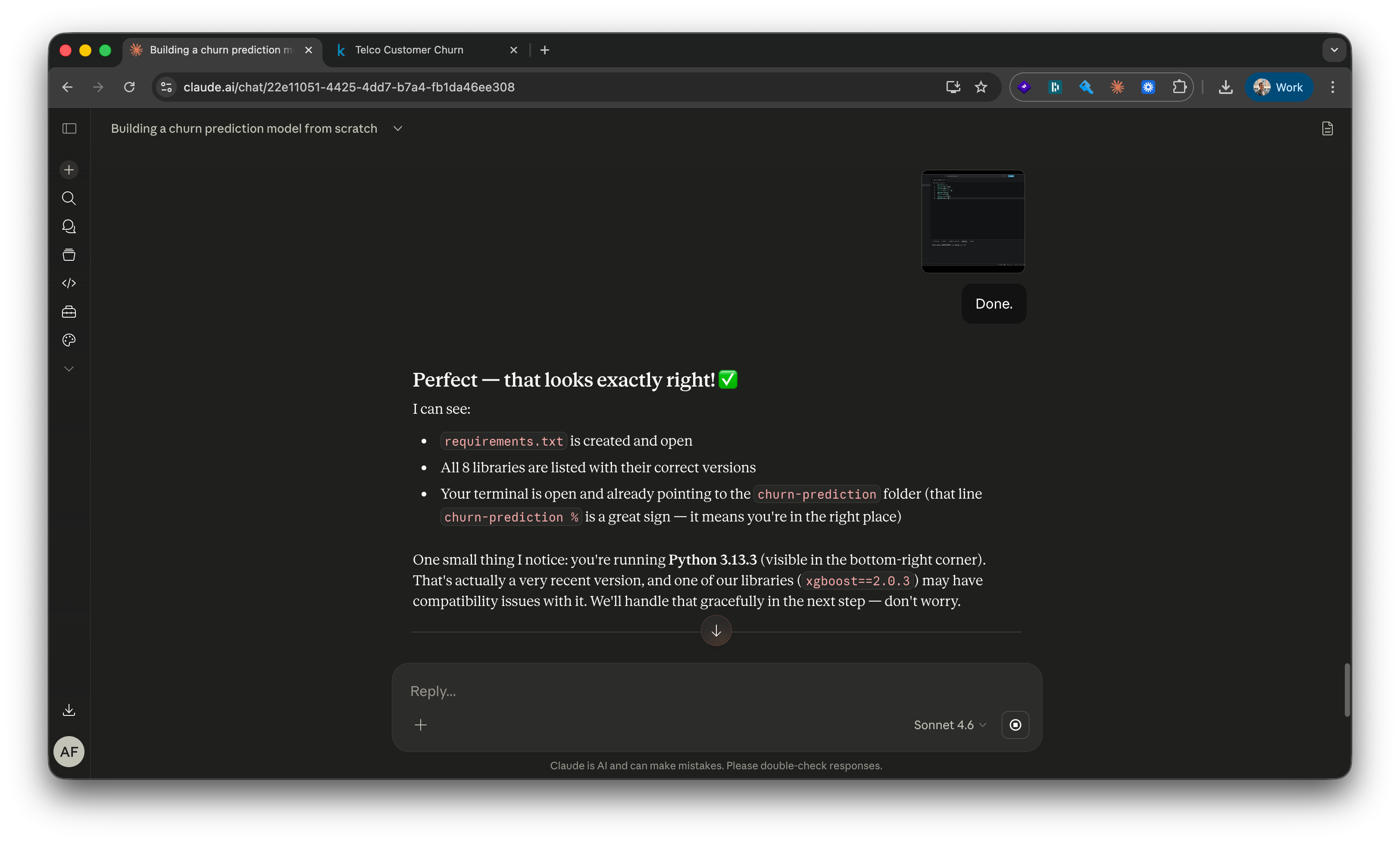
In Phase 1, before any error had happened, the LLM noticed “Python 3.13.3 in the bottom-right corner” of a VS Code screenshot and flagged that one library (xgboost) might need extra handling on that version. It read the kernel selector, the toolbar, the Explorer panel. Save the typing. Paste the picture and let the model do the inspection.
Treat errors as conversation, not failure.
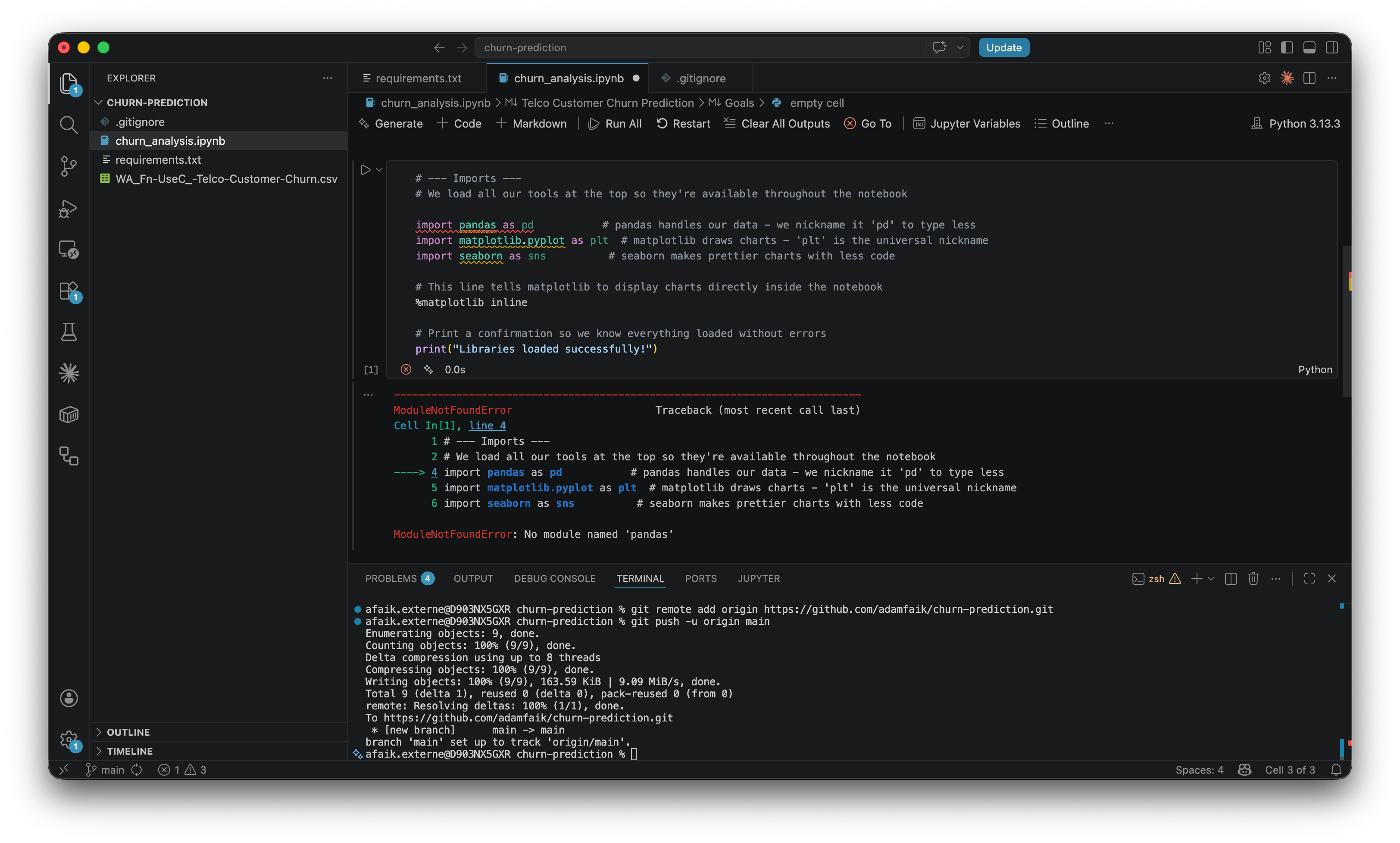
When import pandas as pd returned ModuleNotFoundError: No module named ‘pandas’, the response wasn’t “you broke it.” It was a metaphor and a fix.
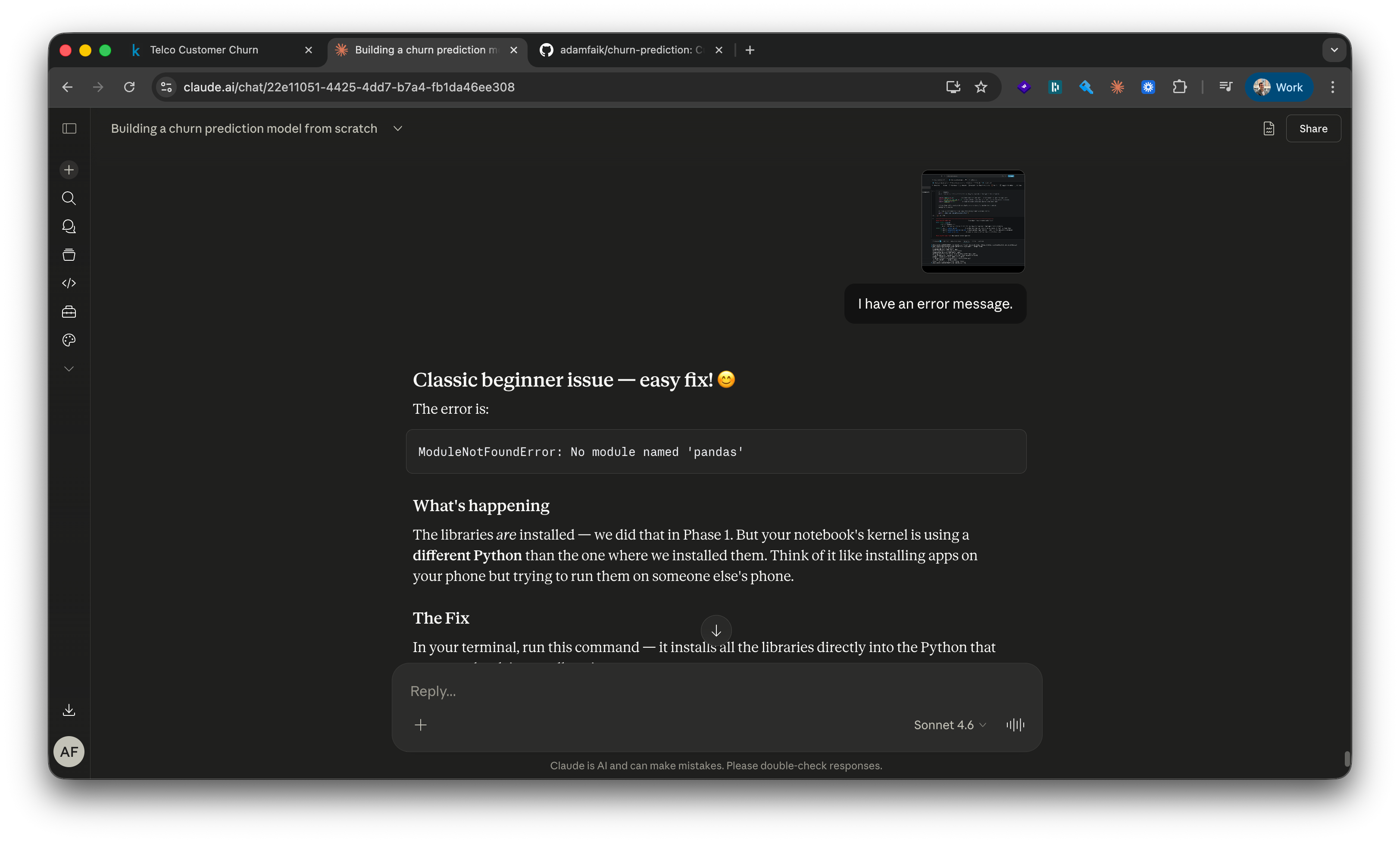
“The libraries are installed, but the notebook’s kernel is using a different Python than the one where we installed them. Think of it like installing apps on your phone but trying to run them on someone else’s phone.” Then a one-line install fix and a “restart the kernel” instruction. Paste the full error verbatim. Ask for the explanation, not just the fix.
Ask for per-line comments on every code block. “Rewrite this snippet with a comment on every single line. I want it to read like a tutorial when I open the file next week.” Those comments became my study notes. They’re also the lines I’ll quote when someone asks how the code works six months later. The pattern is portable: any AI-generated artifact (SQL, config file, spec doc) can be made to explain itself line by line.
Ask the same question three different ways. The LLM doesn’t get frustrated. “Explain this like I’ve never seen code.” “Now as a PM, not an engineer.” “Now with a real-world analogy.” Three takes on the same concept. Keep the one that lands.
Push back when the plan misses something. The original plan in this build skipped GitHub versioning entirely. Phase 1 set everything up locally with no remote backup. I stopped mid-phase, said so plainly, and the plan adjusted immediately (”Great instinct, that’s exactly what real developers do”). You always know your context better than the LLM does. When a gap shows up, name it. The LLM has no ego about being wrong; it integrates the correction without friction.
One warning: when you say “I’m a beginner,” the LLM may oversimplify. It might skip edge cases, skip error handling, or give a version that works for the tutorial but wouldn’t hold up in production. That’s exactly why the second-opinion session above isn’t optional. One session teaches you, a second session audits what you learned. Treat them as a pair, not as alternatives.
The felt experience: what changed for me
Two observations on what working this way actually feels like, hour after hour:
The encouragement is real. When the LLM says “great instinct” or “you caught that yourself before I even explained it fully,” it’s flagging a moment when you did something a beginner wouldn’t normally do. The recognition isn’t decorative. Over the course of an evening’s focused build, those moments add up to a low-grade momentum that’s hard to get from a textbook or a video course.
You can reframe any output in any direction. “Read this output like a PM” worked dozens of times in this build. The same numbers land completely differently depending on the lens: raw accuracy versus retention budget impact versus board-ready story. The LLM switches frames on request, and the second framing is usually the one your team will actually understand.
What this style of learning quietly removes that traditional self-taught paths never could: the loneliness of being stuck, and the rigidity of pre-recorded explanations.
What AI changes about learning
Step back from the build for a moment. One PM, one project, one evening. The bigger story is what’s actually different about learning today, anchored in the same person trying to learn the same kind of thing, ten years apart.
The contrast: same brain, ten years apart
Ten years ago. A 30-hour Udemy course bought on a whim, half-watched in evenings. Stack Overflow for the parts that broke, YouTube comments for the parts that confused. No one to ask the obvious dumb question. No one to translate the textbook into plain English. No one to hold the rope when a side project stalled out. Most people who started never finished. Most who finished couldn’t transfer what they learned to their actual job.
This year. A one-year program at the Sorbonne, evening classes alongside a full-time PM job. The course itself was good. But the actual learning happened in a different place than the diploma suggested it would.
I recorded every lecture, transcribed the audio, and pasted the transcripts into Gemini for cleaner notes with the gaps filled in. Once a unit was done, I dropped everything into NotebookLM and let it generate a podcast and a slide deck to replay on the commute, in the gym, between meetings. And through all of it, I kept a continuous conversation going with Gemini: questions about the lecture content, metaphors that helped a hard concept land, code snippets explained line by line, deeper discussions hours after the actual instructor had gone home. **A 24/7 patient tutor in the pocket.**
The diploma was the scaffolding. The AI was the actual classroom.
The instructor’s new job
This isn’t an argument that AI replaces teachers. The instructor still does work that AI can’t. They tell you what’s possible, including the things AI won’t volunteer because you didn’t know to ask. They give you the principles you need to challenge AI output. They catch the leaks (in this build’s case, a literal data leakage in the model) that you’d miss because you don’t yet know leaks exist.
The four-minute mile is the parallel that fits here. On May 6, 1954, Roger Bannister ran a mile in under four minutes, something the medical community genuinely believed was physically impossible. Within a year, dozens of runners broke the same barrier. Knowing something is possible changes what people attempt. A good instructor today is mostly in the business of expanding what their students believe is possible, and trusting AI to handle the parts that used to require lectures.
One last thing. I’m joining the training team at the Sorbonne on the PM side after this year. Knowing every future student will have a 24/7 patient tutor in their pocket will probably change how I teach. More time spent on what AI can’t do (naming what’s possible, framing real problems, defending judgment calls, holding the rope when a student is stuck on something that has no clean answer) and less on what it now does for free. The job description of “instructor” is being rewritten in real time, and getting to be on both sides of that change at the same moment is one of the strangest and most interesting things happening in education right now.
Start your first project this evening
The bar to start has never been lower. One dataset, one LLM chat session, one question: “give me a beginner-friendly plan.”
Don’t do this for the joy of learning. Do it the next time a real question lands on your desk, the kind that would normally turn into a ticket and three weeks of waiting for the data team. Why are users dropping off, what’s driving conversion, where the support tickets are spiking, which features correlate with retention, which support categories are growing fastest. Pull the export yourself. Ctrl+A, Ctrl+C. Open an LLM chat, not a coding assistant. Paste it in along with what you’re trying to figure out. Ask for a beginner-friendly plan. Spend an evening on it. You probably won’t ship the analysis. You’ll walk into the next meeting with sharper questions than the people still waiting in the queue.
The public repo for this build: github.com/adamfaik/churn-prediction. Everything is there if you want to see what the end looks like before you start.
The second-opinion session is the insight most people skip. The tutor session can't catch its own blind spots. it's been inside the build since the beginning. A fresh session with no history has no stake in defending earlier decisions. That's not a workflow trick, it's an epistemology.
The TotalCharges leakage example is perfect: the model wasn't predicting churn, it was detecting it after the fact. That distinction only shows up when someone walks in without context.
I write about production AI systems and distributed backends the layer where these models actually run. Worth a subscribe here too.