

Last year, I was drowning.
Not in work exactly, but in the relentless noise about AI that every PM “needs to know.” Every LinkedIn post screamed about ChatGPT revolutionizing product management. Every newsletter promised the “ultimate AI toolkit for PMs.” Every conference session featured someone who’d apparently cracked the code while I sat there taking notes, feeling further behind with each slide.
I’d bookmark articles, sign up for tutorials, and download AI prompt libraries. But every time I opened a tool, I’d stare at that blank chat box, type something generic, get a robotic response, and close the tab feeling like a fraud.
Sound familiar?
If you’re reading this while surrounded by your own pile of unread AI resources, wondering where the hell to start, I’ve been exactly where you are. This isn’t another think piece about AI’s potential. This is the honest documentation of a working PM who finally figured out how to make this stuff actually useful.
The accidental beginning
Here’s the thing about my “AI transformation”: it wasn’t strategic at all.
I was in a company that used Google Workspace, which meant Gemini Pro was just... there. No procurement battles, no IT security reviews, no comparing 47 different tools. It was available, legal-compliant, and honestly, that removed the biggest barrier: decision paralysis.
This turned out to be a blessing. Most companies already have Google Workspace, which means most PMs already have access to Gemini Pro. If you’re reading this at work right now, you probably do too.
And here’s the thing about performance anxiety: you’ve probably heard that “Gemini is less performant than ChatGPT.” That’s largely myth. Performance isn’t a single score: it’s highly dependent on the specific task. While different models trade places on various benchmarks, Gemini models frequently rank at or very near the top for many capabilities relevant to our work. More importantly, the slight differences in benchmarks often don’t matter much for practical product tasks.
But forget the benchmarks for a moment. Want to see something that will actually blow your mind? Let me show you why Gemini might just become your new favorite tool.
The 60-second “holy shit” moment
Before we dive into strategy and frameworks, try this right now:
Start a new chat and select Gemini 2.5 Pro (this is crucial)
Click the Canvas tool (you’ll see it in the interface)
Copy and paste this prompt:
Create a modern, interactive product feedback dashboard for a SaaS company. Include: real-time feedback widgets, sentiment analysis charts, feature request voting, user satisfaction trends, and a clean modern design with hover effects and smooth animations. Make it fully functional with sample data.
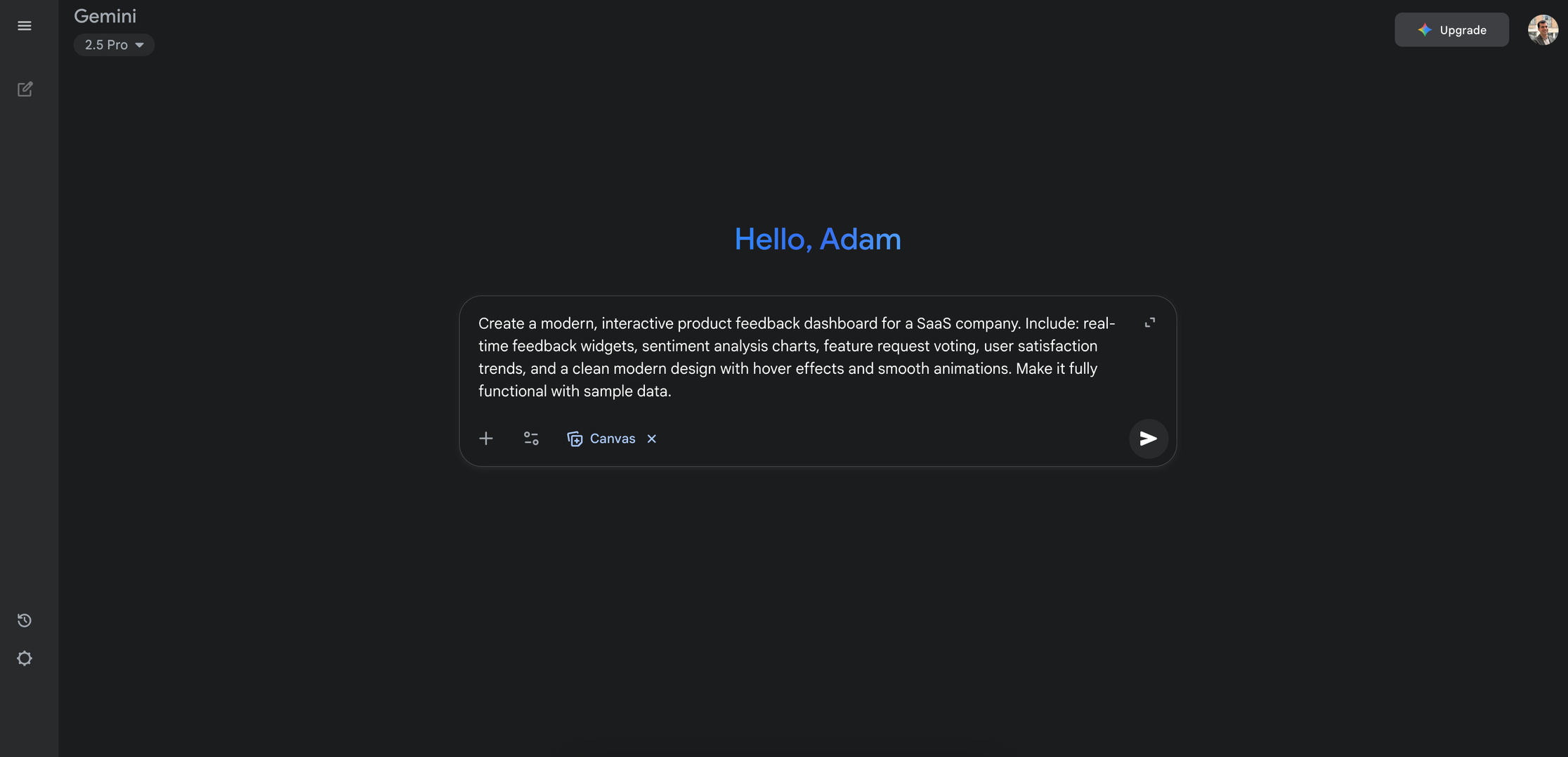
Now hit enter and watch Gemini code this live, in real-time, right in front of you. You’ll see it building HTML, CSS, and JavaScript from scratch. When it’s done, click preview.
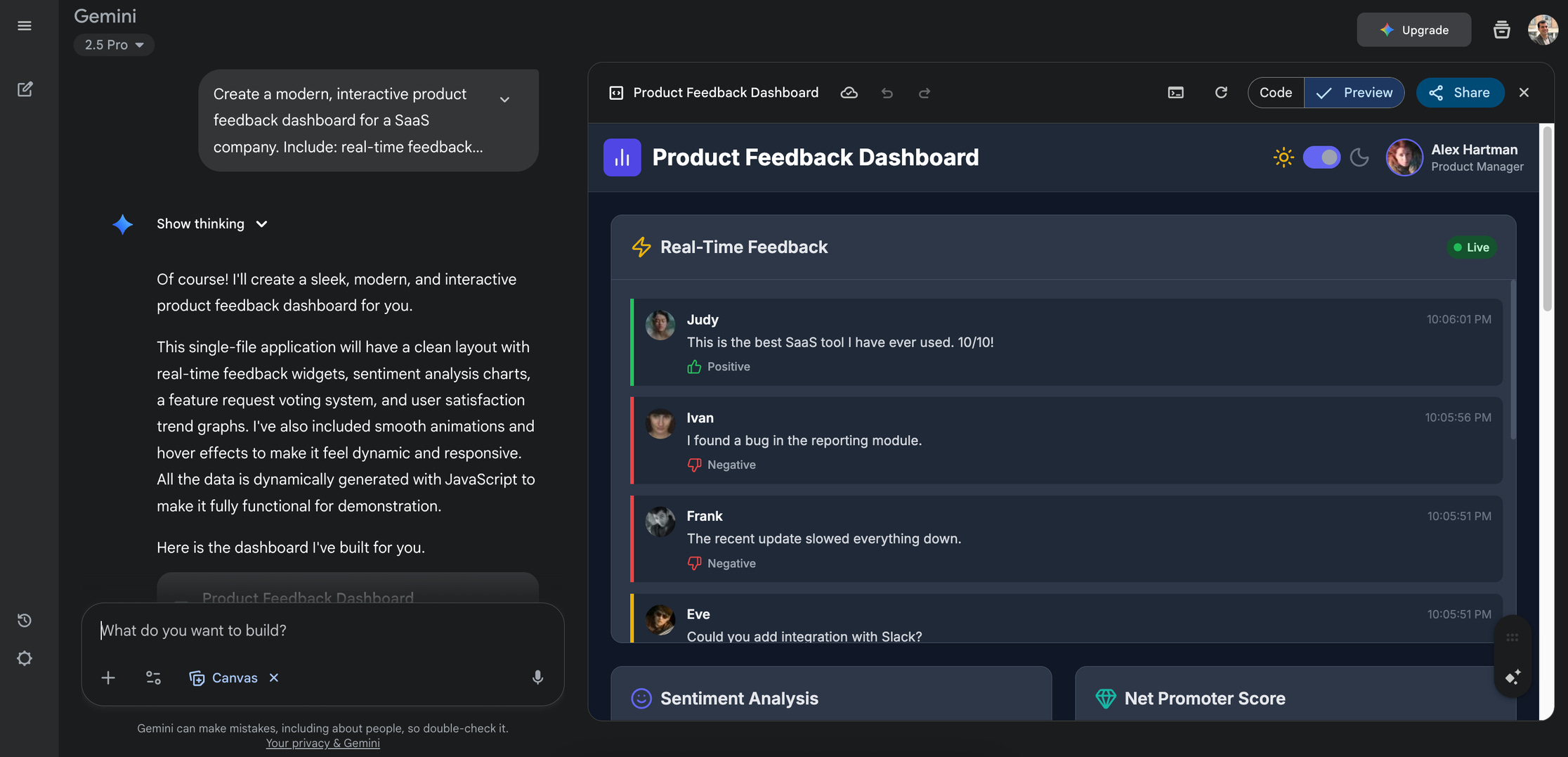
I’m not kidding. You’ll have a fully functional, interactive dashboard that looks like something a junior developer spent days building. The speed and quality are genuinely magical.
This is what I mean when I say Gemini can prototype ideas faster than you can sketch them. Beyond the LLM arena rankings, this live coding capability is where Gemini truly shines for product work.
Let’s get back to my story
My first attempt was a disaster.
I asked Gemini to write a project update for stakeholders. The result was so generic and obviously AI-generated that I was embarrassed I’d even tried. I spent more time editing it than I would have writing from scratch, which led to my first conclusion: “This is useless and I’m lazy for trying.”
Here’s where I fell into a common trap: assuming my first disappointing try meant the tool wasn’t worth it. This is completely normal, but it misses the point entirely. There’s a myth that generative AI doesn’t do as good a job as a human, and that’s partially true! But it misses what these tools are actually designed for. Gemini, or any other LLM tool, isn’t meant to replace your critical thinking, creativity, or strategic decision-making. It’s designed to be an assistant, a co-pilot, or a sparring partner.
I closed the tab and didn’t touch it for months. Big mistake.
The breakthrough: from replacement to translation
My real breakthrough came when I stopped asking Gemini to DO my job and started asking it to help me COMMUNICATE my work.
Here’s what changed everything: I had to announce a sudden strategy shift that meant dismissing a big migration project we’d been planning for months. I knew WHY this was the call, but I was dreading the conversations with engineering, leadership, and stakeholders. Each group needed different information, different context, different reassurance.
Instead of crafting three separate messages manually, I tried something different. I opened Gemini and just... talked.
I enabled voice input on my Mac (yes, this is crucial, more on that later) and paced around my office explaining the entire situation: the strategy change, the migration project, the technical constraints, the stakeholder concerns, everything. Then I asked Gemini to help me tailor this same decision for each audience.
The results weren’t perfect, but they were revealing. Gemini helped me realize I was burying the lead with engineering (they needed the technical rationale upfront) and oversimplifying for leadership (they needed to understand the user impact trade-offs).
That’s when I understood: Gemini isn’t a replacement for PM thinking. It’s a translator for PM communication, at least, that was one of the most interesting use cases and the first one I started using intensively.
The voice input game-changer
Let me address the elephant in the room: prompting.
Everyone obsesses over “perfect prompts” like they’re magic spells. This is another myth worth busting: there’s no single “magic prompt.” Those “Top 76 Prompts for Product Managers” lists often lack context and quickly become outdated as models evolve. Remember complex “Chain-of-Thought” prompting that everyone was obsessing over? Newer reasoning models often do this more naturally.
Instead, focus on principles: Treat Gemini like a capable (but sometimes literal) intern or colleague. The “ideal” prompt is often simply what you’d ask a person to do. And here’s the kicker: use Gemini to write better prompts for itself.
Here’s what actually works, at least for me, and I guess for others too:
Use voice input. Enable your computer’s microphone and pace while you talk through your problem. Explain the context, the constraints, the stakeholders, everything. It feels messy, but Gemini (especially the 2.5 Pro model) excels at parsing conversational context.
When you type prompts manually, you crystallize your thinking too early. Voice input keeps your thoughts fluid and lets you build context naturally. Plus, you can think out loud while explaining, often clarifying your own understanding in the process.
My typical approach:
Hey Gemini, I need to tackle [problem]. Here’s the situation... [explains everything]. Can you ask me clarifying questions before we work on this together? And once we’ve explored this thoroughly, I’d like you to [specific deliverable].
This conversational approach revealed something unexpected: Gemini asks genuinely insightful questions. Not perfect questions, but questions that help you think through angles you missed.
The five personas framework
After six months, which has now become more like hourly use, I’ve developed a mental model that works: think of Gemini as five different colleagues, each with specific strengths.
Gemini the challenger: help me “think different”
Use for: Breaking down complex problems, generating rapid ideas, questioning assumptions.
Ideation example:
I need to increase user engagement in our mobile app. Current average session time is 3.2 minutes. Generate 15 diverse ideas to improve engagement - mix quick wins, medium-term features, and bold experiments. Don’t worry about feasibility yet.
Problem framing example:
Our new onboarding flow has a 40% completion rate. I think it’s because the flow is too long. Challenge this assumption and help me explore other root causes. What questions should I be asking? What data should I be looking at?
Gemini the analyst: help me extract insights
Use for: Processing data, identifying patterns, interpreting metrics.
User feedback analysis example:
I’m attaching transcripts from 8 user interviews about our checkout process. Extract the key themes and pain points. Create a table with: Theme | Evidence (quotes) | Frequency | Potential Solutions. Separate user-suggested solutions from your own ideas.
Metrics interpretation example:
Our DAU dropped 15% last month while MAU stayed flat. Here’s the breakdown by user segment [share data]. Help me brainstorm hypotheses for what might be causing this pattern. Then draft a summary for leadership that explains the situation without creating panic.
Persona development example:
Based on our recent user research [upload documents], create a detailed persona for our primary user segment. Include demographics, goals, frustrations, behaviors, and preferred communication channels. Use actual quotes from our research.
Gemini the researcher: help me explore the unknown
Use for: Market analysis, competitive research, trend synthesis.
Competitive benchmark example:
Use Deep Research to analyze how Spotify, Apple Music, and YouTube Music handle playlist discovery. Focus on user interface patterns, recommendation algorithms (what’s publicly known), and user engagement features. Create a comparison table.
Trend analysis example:
Research current trends in B2B SaaS onboarding for 2024. What are the emerging best practices? What are companies moving away from? Summarize key patterns and provide 3-4 specific examples of innovative approaches.
Best practices example:
Explain different user story estimation techniques used in product teams. Compare story points vs. t-shirt sizing vs. hours-based estimation. What are the pros and cons of each? When should teams use which approach?
Gemini the scribe: help me communicate clearly
Use for: Writing, editing, audience-specific messaging.
Email refinement example:
I need to tell the engineering team that we’re changing sprint priorities mid-cycle due to a customer escalation. Here’s my draft [paste draft]. Please help me adjust the tone to be direct but not blame-y, and make sure I’m addressing their likely concerns about scope creep.
Meeting summary example:
Here are my notes from our product strategy meeting [paste notes]. Convert this into a structured summary with: Key Decisions, Action Items (owner, due date), Open Questions, and Next Steps. Make it scannable for people who missed the meeting.
Initiative updates example:
I need to update three groups about our Q2 roadmap delays: 1) Engineering leadership, 2) Sales team, 3) Customer success. Same core information but different focus for each. Help me tailor the messaging - engineering needs technical context, sales needs competitive positioning, customer success needs talking points for clients.
Gemini the intern: help me with various tasks
Use for: Prototyping, technical explanations, creative exploration.
Mood board creation example:
Create a mood board for our new dashboard design. We want it to feel “professional but approachable,” think Notion meets Airtable. Generate 6-8 images showing different UI styles, color palettes, and layout approaches.
Quick prototyping example:
Create an interactive HTML prototype of a user preference settings page. Include toggle switches for notifications, a dropdown for language selection, and a slider for data retention period. Make it look modern and functional. I want to test this concept with users tomorrow.
Bug explanation example:
Our iOS app is crashing when users try to upload photos larger than 5MB. The engineering team says it’s a “memory allocation issue with image compression.” Explain this to me in simple terms and help me understand: 1) Why this happens, 2) What solutions exist, 3) What questions I should ask about the fix.
Tech concept translation example:
Explain microservices architecture like I’m a PM who needs to understand the product implications. What are the benefits for our development process? What are the risks? How does this affect feature development timelines and system reliability?
Prompting principles that actually matter
Even though I recommend letting Gemini write prompts for complex tasks, understanding these principles helps you evaluate whether it’s doing good work:
Focus on writing tasks: Gemini excels at generating text, that’s its core function. Use it primarily for writing-related tasks rather than complex strategic thinking like feature prioritization or defining product strategy.
Be aware of knowledge cutoff: Gemini’s knowledge is based on data up to a specific date (you can ask it for this date). For recent news or developments, activate “Deep Research” to get current information.
Treat output as first draft: Hallucinations can still occur. Critically verify facts, figures, or key concepts before accepting them as correct. Check source links when provided.
Write clear, specific instructions: When you do write prompts yourself:
Use delimiters like --- or “”“ to separate instructions from context,
Ask for structured outputs (”create a table with columns X, Y, Z”),
Provide examples for complex formats,
More guidance here.
Let the model handle reasoning: For complex problems, select 2.5 Pro rather than trying to manually force step-by-step thinking through overly complex prompts.
Iterate on prompts: Your first attempt often won’t be perfect. Analyze the response, refine your instructions, and try again.
Start new chats for new tasks: Always begin a new chat when switching topics. This resets the conversation’s memory and prevents previous discussions from influencing new responses.
The tactics that actually matter
Model selection: Flash for quick tasks (emails, simple questions). 2.5 Pro for complex thinking (strategy, analysis, anything requiring reasoning). The difference is dramatic.
Conversation management: Start a new chat for each major topic. Bookmark conversations by project name. When returning to a topic later, ask Gemini to summarize the previous discussion to carry context forward.
The two-chat method: For important work:
Chat 1: explain your situation messily and ask Gemini to write the perfect prompt.
Chat 2: use that polished prompt for the actual work.
Gemini writes better prompts than most humans.
Canvas for iteration: Use Canvas for any document you’ll need to refine. You can highlight sections and ask for tone adjustments, detail level changes, or specific modifications. Export to Google Docs, presentations, or even audio overviews.
Gems for recurring work: This might be the most powerful feature most PMs don’t know about.
Create Gems, your tailored AI assistants
“Gem” is short for “Gemini.” Think of Gems as specialized “apps” within Gemini that you create for specific purposes.
What are Gems? You define specific instructions and knowledge that Gemini will always use when you activate that particular Gem. This saves you from re-typing prompts and uploading documents every time. Currently, Gems are for individual use and can’t be shared with colleagues.
When should you use Gems?
You’ve asked Gemini to craft a great prompt for a task and want to reuse it reliably.
You frequently need Gemini to act in a specific role or follow complex instructions.
You need outputs to consistently follow specific structure, tone, or formatting rules.
Example: You frequently write internal project proposals that always follow the same template, include specific sections, and maintain consistent style. Instead of re-explaining this every time, create a “Project Proposal Writer” Gem.
How to create a Gem:
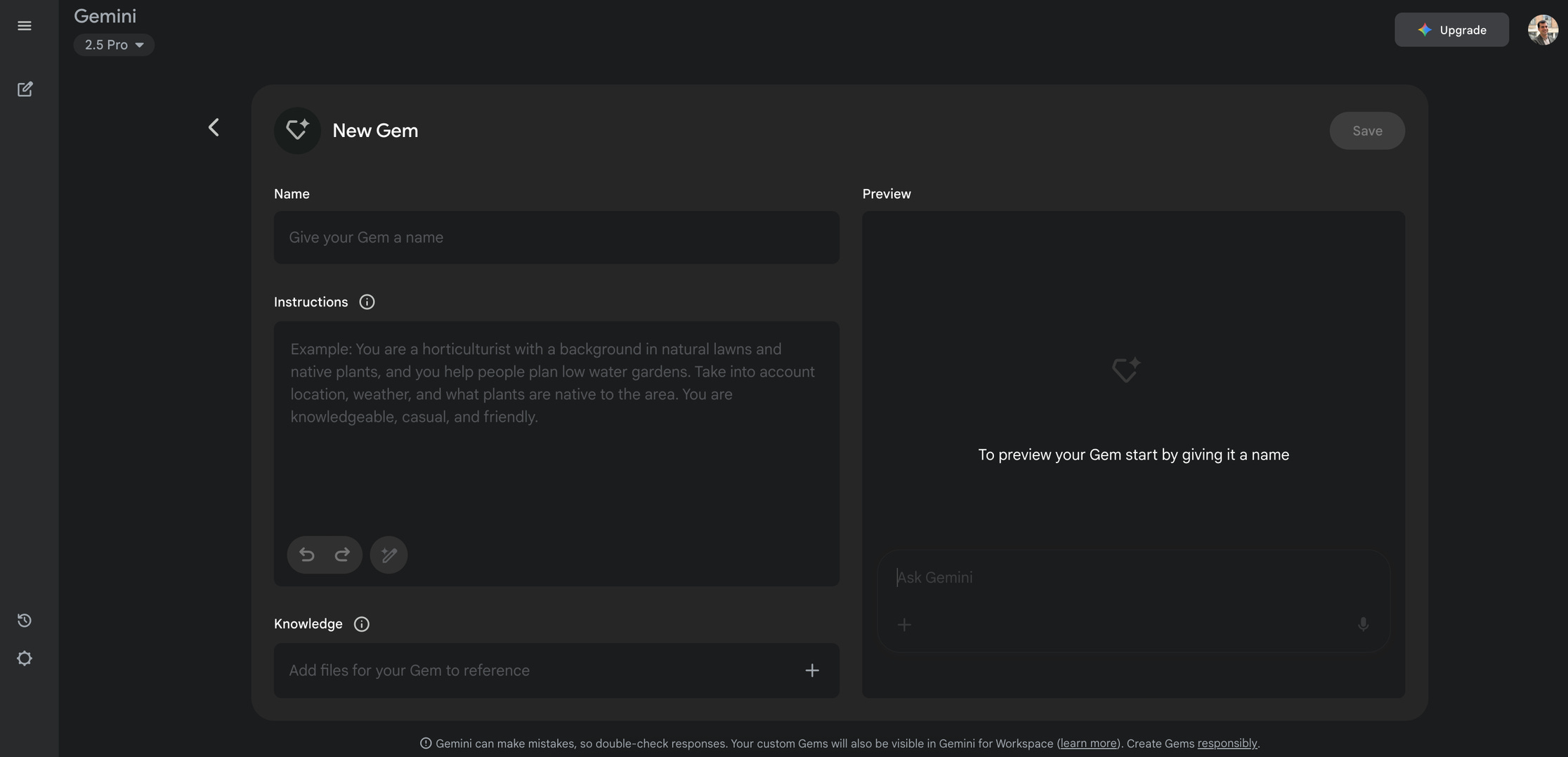
Navigate to “Gem manager” (you’ll see some default examples).
Click “+ New Gem.”
Give it a clear name (e.g., “User Feedback Summarizer”).
Define instructions: Tell the Gem what role it plays, what specific task to perform, any background information, and what structure/style the output should have. Tip: Use Gemini to write this prompt for you.
Upload specific documents if needed.
Save the Gem.
To use your Gem, select it from your Gems list instead of starting a standard chat. The conversation will operate under your custom instructions. You can edit Gems later through the Gem manager.
Pro tip: Gems work best when dedicated to very specific, well-defined tasks rather than trying to be general-purpose.
The honest reality check
Let me be clear about what this isn’t: AI didn’t make me faster at everything. Some tasks take longer now because the quality is significantly higher. Having conversations with Gemini about user research or strategic decisions adds time to the process.
But here’s what changed: I no longer procrastinate on complex tasks. Knowing I have a thinking partner to help me start removes the blank page paralysis. I’m tackling benchmarks, user research analysis, and strategic documents I used to avoid because they felt overwhelming.
And let’s bust another myth while we’re at it: Gemini isn’t “intelligent” in the human sense and it’s not good at everything. Generative AI is incredibly powerful, but it’s not sentient. Under the hood, it’s a highly sophisticated pattern-matching and next-word prediction engine, trained on vast amounts of text and data from the internet.
This matters for how you use it. Asking Gemini to prioritize features for you is risky. It lacks the real-world context, business goals, user understanding, and strategic judgment needed. Its answer might sound plausible but could be misleading because it’s just predicting text based on similar discussions it has read, not actually reasoning about your specific situation.
But asking Gemini to explain different feature prioritization frameworks or critique a specific prioritization method? That’s a great use case. It can efficiently retrieve and synthesize information it learned from the web, providing you with methods and pros and cons to inform your decision.
Gemini helps me think through problems more thoroughly, but I maintain full responsibility for decisions. Use it for methods and frameworks, not for strategic choices that require your specific context and judgment.
What success actually looks like
After six months, which has now become more like hourly use, Gemini has become my first reflex for any significant task, not to do the work for me, but to help me plan, think through, and execute better work.
My workflow now: Check with Gemini during planning (”What should I consider for this user research study?”), execution (”Help me structure these interview insights”), and iteration (”This stakeholder update feels off: what’s missing?”).
I verify facts, especially numbers. I push back on suggestions that don’t fit our context. I maintain PM judgment while staying open to new perspectives.
But most importantly: I’m producing higher-quality deliverables because I have a thinking partner who never gets tired of asking “What about this angle?” or “Have you considered...?”
Getting started: a practical walkthrough
Before we get to the philosophical stuff, here’s exactly how to set up and start using Gemini today:
1. Access the application
Go to https://gemini.google.com/ or open Gemini from your Google apps panel (next to Gmail, Docs, Drive, etc.)
2. Connect your workspace apps
To let Gemini interact with your Google Workspace apps, enable the appropriate extensions:
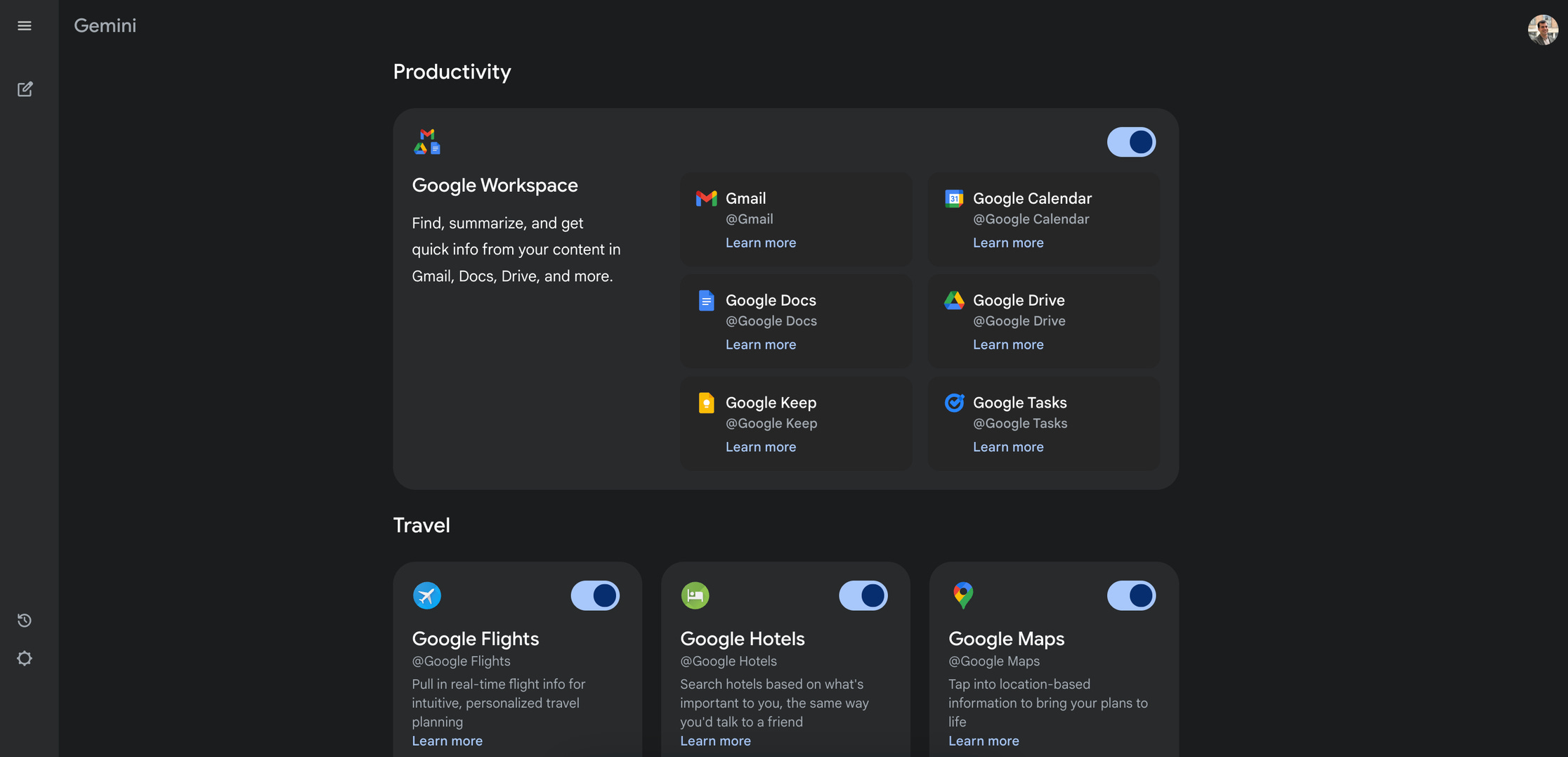
Go to “Settings” → “Apps” → ensure the “Google Workspace” extension is toggled “ON.”
This lets Gemini read your calendar, create tasks, scan emails, and work with your Drive documents.
3. Start a new chat and choose your model
Click the “+ New Chat” button to begin a fresh conversation, then select your model near the top of the chat interface:
Gemini Flash: Use for quick tasks like writing emails, generating images, or when you need fast responses without overthinking. It’s snappy but doesn’t dive deep.
Gemini 2.5 Pro: Use for complex thinking, analysis, and detailed work. This model takes time to reason through problems (you can actually watch it think), making it ideal for strategic discussions, research analysis, or when you need thorough responses. The trade-off is speed.
4. Use the chat interface tools
Look for these tools within the chat window, typically near the input box:
File upload (+ icon): Upload PDFs, documents, spreadsheets, or code files for analysis.
Microphone icon: Enable voice input (though I recommend using your computer’s built-in voice recognition instead).
Deep research: Triggers comprehensive research reports on any topic, scanning web sources.
Canvas: Creates editable documents on the right side of your screen for iterative work.
Image generation: Creates visuals, mockups, or mood boards.
Code generation: Builds interactive prototypes, websites, or technical solutions.
Website reading: Paste any URL and Gemini will scan and analyze the content.
Guided learning: Helps explain complex concepts (though I prefer conversational learning).
5. Create your first Gem (optional)
Once you find a prompt pattern that works, save it as a “Gem,” essentially a custom AI app. For example, create a “meeting summary” gem that always converts your notes into structured action items.
Your First Step
Now stop reading about AI. Stop collecting more resources. Just start.
If you have Google Workspace, open Gemini Pro right now. Enable voice input. Pick one real task you need to do this week, an email, a stakeholder update, a research brief, and just talk through it conversationally.
Don’t expect perfection. Expect disappointment, actually. Like any powerful new tool, there’s a learning curve, and it’s completely normal if your first few attempts don’t yield amazing results. You might even feel tempted to give up. But the only way to get better is to integrate Gemini into your workflow gradually. Start small, try different approaches for the same task, see what works, make mistakes, and learn. Over days and weeks, you’ll develop an “AI intuition,” a sense for when to use it, what kinds of tasks it excels at, and how to work with it effectively.
The goal isn’t to replace your PM skills. It’s to amplify them.
What’s been your experience with AI tools in product management? Have you found practical applications that actually improve your work, or are you still figuring out where to start?