

I’ve been in the product game for a decade. I’ve seen the trends come and go. Agile, Lean, Web3, whatever was cool last Tuesday. Usually, the core job stays the same. But let’s be honest: AI is not just another trend. It’s a fundamental shift in how we build. It changes everything. It’s not just about productivity (I actually hate that corporate buzzword). It’s about extending your abilities. You can suddenly do things that used to take a team of three. You can execute faster and more efficiently. The opportunities to solve user problems are exploding right now. We have never had this much leverage to deliver value instantly.
A few months back, I wrote an article sharing the best videos I found to help anyone get started with AI tools. It was about developing that first AI reflex.

But looking back, that was just the warm-up. We are facing a much bigger shift now.
Think about industrial engineers at a company decades ago. They spent their lives drafting beautiful blueprints on paper. It was an art. Then, Computer-Aided Design (CAD) arrived. Imagine telling those engineers to drop their pens and start modeling on a screen. It must have felt unnatural. They probably hated it at first. But today, you cannot build a plane or car with paper and pencil. We are in that exact moment again. I see smart people freeze up when they have to write a prompt. It’s a mental block. But the “paper era” of product management is over. We have to learn CAD.
I wanted to create a crash course specifically for product people to make this jump. I went down the YouTube rabbit hole. It’s honestly shocking how much expert knowledge is free right now. But nobody has time to watch 100 hours of video. So I cheated. I opened a conversation with Gemini. I fed it transcripts video by video. I made the AI do the heavy lifting to filter the noise. It took some time, but it saved me weeks of watching bad tutorials.
The result is a tight, 15-hour curriculum of absolute gold.
I am willing to bet on this: by the end of this year, our job will look completely different. Here is exactly where the industry is going. These are the four massive themes you need to master:
Use AI for product work: We aren’t just summarizing meeting notes anymore. We are using LLMs and prototyping tools for extremely precise use cases. We can simulate user personas to debate ideas before we even build them. We can prototype high-fidelity solutions in an afternoon. We have never had a better chance to do our job with this level of quality. It’s about being an artisan who knows exactly which tool to pick for the job.
Adopt an IDE as your work cockpit: This is the scary part for some, but there is no secret here. For ambitious projects, product people need to go where the code lives. The days of handing off a Google Doc are ending. We need to work directly in Github repositories and use IDEs like Cursor or VS Code. We will be writing specs, reviewing PRs, and vibe coding directly in the environment where the product is built. If you want to ship fast, you have to be in the cockpit.
Multiply your output. You need to become a super-individual. New AI tools drop almost daily. You don’t need to master them all, but you need the curiosity to test them instantly. You need to develop your AI sensitivity. It’s about realizing that using your voice to dictate context is 10x faster than typing. It’s about building a personal external brain that handles the mundane so you can focus on the strategy.
Build AI into your product roadmap. We are all becoming AI product managers. We aren’t just using AI: we are putting it in the roadmap. This means understanding new architectures. We need to treat things like Model Context Protocol (MCPs) as products in their own right, just like we used to treat APIs. We have to figure out how to sell, test, and ship probabilistic software that adds massive value to the client.
Notes:
Don’t get hung up on the specific tools: focus on the underlying principles, as the software evolves but the mindset remains universal.
You will see some concepts overlap across these sessions; treat this as validation, not repetition, as seeing the connections is the fastest way to learn.
For those who prefer to dive straight in, here is the full YouTube playlist so you can binge-watch the entire curriculum without my commentary.
I’ve organized the videos to cover these four pillars. I think this curriculum is the best content produced in the last months. It will stay relevant for maybe 5 or 6 months. That is how fast we are moving. So let’s not waste any more time.
Chat with the content
Watching 15 hours of video is a heavy lift. I know you want the insights, but you might not have the time to scrub through every minute. So, I decided to apply the very principles we are about to discuss.
I took the links of every single video in this guide and fed them into a NotebookLM.
Think of this as your on-demand board of directors. Instead of passively watching, you can now interrogate the content. If you are stuck on a specific problem, like “How do I actually set up a calendar agent?” or “What is the first step to test a risky idea without code?” don’t guess. Just ask the notebook.
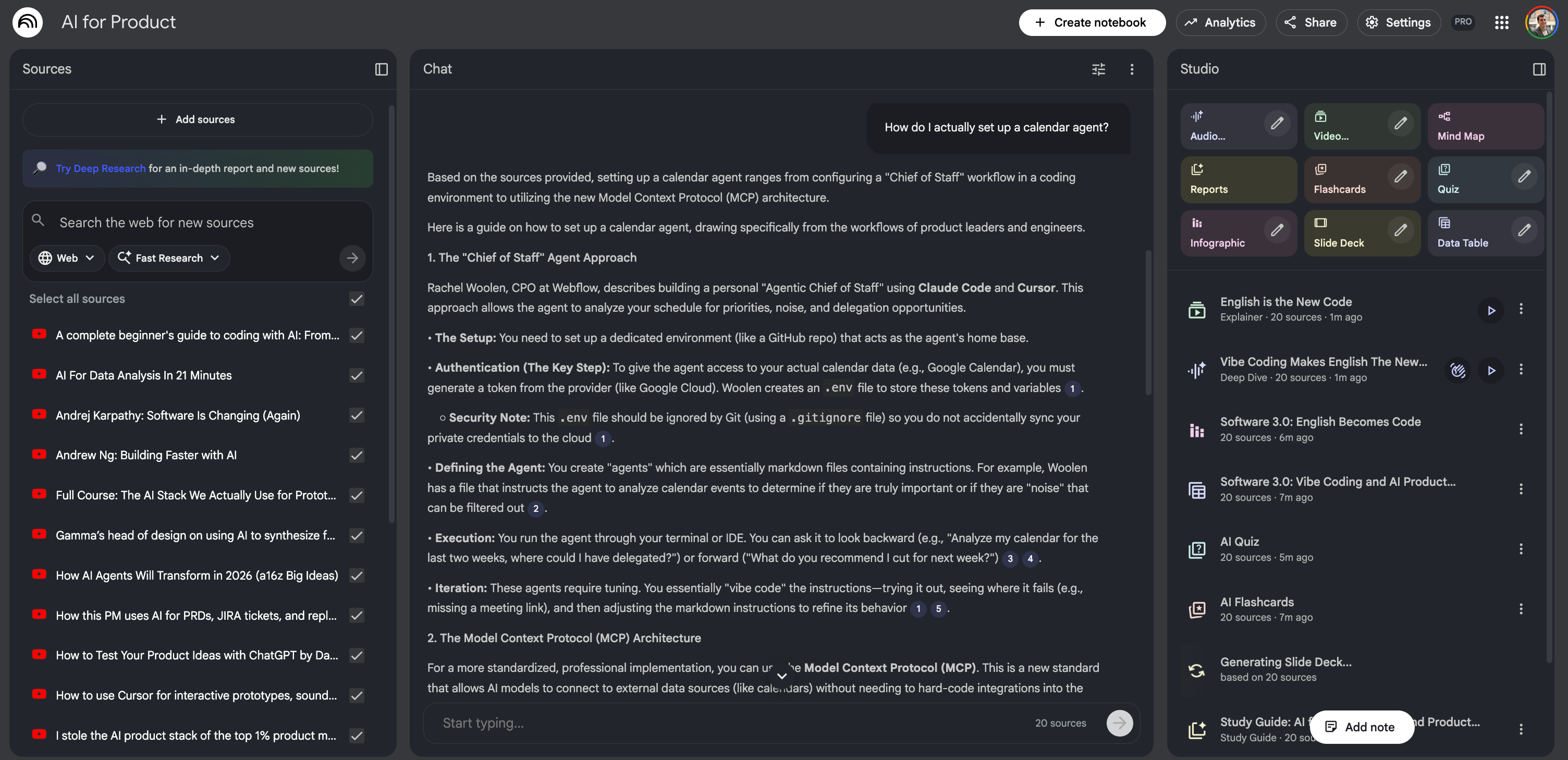
It will search the collective wisdom of these 20+ experts and give you a specific answer, citing the exact video and timestamp it came from. It feels a bit like magic, having this entire group of geniuses sitting in a room, waiting to answer your specific question.
Okay, enough talking from me. The studio lights are dimming, the ice is melting in the glass, and it’s time to get into the music. I’ve arranged these tracks to tell a story, but feel free to skip to the one that speaks to you. Let’s play the first set.
Module 1: Use AI for product work
Let’s settle in and get to work. This first module is where the rubber meets the road. We aren’t just talking about writing better emails here. We are talking about mastering the core end-to-end workflow of our craft: researching, validating, and prototyping features in record time. The goal here is simple: to help you execute your core product tasks ten times faster by chaining specialized tools together.
Over the next five hours of content, we are going to go on a journey through the product lifecycle. We kick things off with Marily Nika, who sets the stage for this new mindset. Then, we dive deep into the data: Zach Leach will show us how to handle qualitative research at scale, followed by Tina Huang on crunching quantitative numbers without needing a data science degree. Once we have the data, we need to prove we are right, so David Bland will walk us through validation strategy. Finally, we wrap up by getting our hands dirty with Aakash Gupta and Colin Matthews, moving straight into prototyping. It’s a dense, practical start, so grab a coffee.
1/5. Generate a full product from scratch (40 min)
Let’s start with a bang. You know how product discovery usually feels? Weeks of scheduling user interviews, endless sticky-note sessions in Miro, and drafting PRDs that nobody reads. What if you could compress all of that into one afternoon?
This first video features Marily Nika, an AI product lead at Google. She isn’t just talking theory; she is showing us a speedrun. She takes a random idea (a smart fridge) and goes from “I wonder if this is a good idea” to a full PRD, a coded prototype, and a marketing video.
It’s a perfect example of what I call tool hopping. She doesn’t try to make one AI do everything. She acts like an artisan, picking up the right tool for the exact right moment. Watch closely how she doesn’t just ask the AI for validation. She forces it to challenge her.
Did you catch that trick with Perplexity? That was the aha moment for me.
Most people just ask, “Is a smart fridge a good idea?” and the AI, being a people-pleaser, says, “Yes! Everyone loves fridges!” Marily didn’t do that. She scraped Reddit for real user data, then created two AI agents, one who loves the idea and one who hates it. She forced them to debate each other. She only moved forward with the features that convinced the hater. That is how you can engineer artificial conflict to get to the truth.
Here is the cheat sheet from this session:
Don’t write PRDs from scratch. Marily fed the debate results into a Custom GPT trained on her specific PRD template. It generated the document instantly.
The PRD is the prompt. She didn’t tell v0 “make me a fridge UI.” She pasted the entire PRD into the coding tool. The result? A UI that actually matched the specific requirements (like the “local-only” privacy mode).
Video kills the slide deck. Instead of a PowerPoint, she used video generation tools (like Sora/Veo) to show the user story. It’s much harder for a stakeholder to say no to a video that makes them feel something.
The AI judge. Did you see how she used NotebookLM at the end? She uploaded audio files of pitches and asked it to act as an unbiased judge. This is brilliant for hackathons or even ranking your own roadmap ideas.
Your action: Try the debate technique today. Take a feature you are unsure about, spin up two personas in ChatGPT, and make them fight. The winner gets into your roadmap.
2/5. Analyze feedback and generate designs (40 min)
Here is a nightmare scenario every PM knows: you launch a feature, and suddenly you have 550 rows of user feedback in a CSV. Half of them are in Turkish, Spanish, or French. Usually, you read the first twenty in English, get tired, and guess what the rest say. That is not data; that is vibes.
In this session, Zach Leach, head of design at Gamma, shows us how to stop guessing. He reveals a use case for deep research that most people miss. We usually think of these tools as browsers that go out to the web to find answers. Zach shows us that their real power is looking inward, digesting massive, messy internal files to find patterns a human would miss. Plus, stick around for the second half where he shows how to force Midjourney to stop generating generic AI art and actually follow your brand guidelines.
The most important takeaway here is the distinction Zach made between Python analysis and deep research.
When you upload a CSV to a standard LLM and ask for a summary, the AI usually writes a lazy Python script to count keywords. It sees the word “slow” 50 times and tells you “users think it’s slow.” That is shallow. By forcing the model into deep research mode on a local file, Zach forced it to actually read and reason about every single row, regardless of language. It understood that a user complaining about “extra arms” on a generated image wasn’t a bug report about biology. It was a specific critique of their vectorization model.
Here is the cheat sheet from this session:
Deep research is also for local files: Don’t just use it to search things. Upload your rawest, ugliest datasets (CSV, PDF, Slack dumps). It shines at cross-referencing internal data that is too large for your context window but too nuanced for a simple keyword search.
Globalize your listening: Zach didn’t translate the feedback first. He let the model handle the translation and sentiment analysis simultaneously. This allows you to analyze 100% of your feedback, not just the English-speaking slice.
Brand lock-in: For the designers, the style reference (
--sref) trick in Midjourney is non-negotiable. Stop trying to prompt “surrealist colorful bird.” Feed it your brand kit as a reference image so the AI adopts your exact aesthetic instantly.The replicate approach: Note how he didn’t try to make Midjourney do the background removal. He used Replicate for that specific task. This reinforces the tool hopping lesson: use generalists for creativity, specialists for utility.
Your action: Go find that neglected CSV of open-ended survey responses or NPS verbatims you haven’t looked at in months. Upload it to a deep research capable model today and ask it to “classify these into 5 distinct problem buckets.” You will be shocked at what you missed.
3/5. Clean and visualize your data (30 min)
Quantitative analysis usually scares product managers. We either wait weeks for a data analyst to run a SQL query, or we suffer through pivot tables ourselves. We often treat data as “black and white.” It’s either right or wrong. But with AI, we run the risk of hallucinated analytics. You ask for a chart, and the AI gives you a beautiful line that goes up and to the right, but it made up the numbers.
In this session, Alice Yang, a former Meta data scientist, teaches us how to avoid that trap. She introduces vibe analysis, which sounds funny, but is actually a rigorous method called DIG. It’s the difference between a Junior PM who blindly trusts the chatbot and a Senior PM who audits the machine. She also shows how to turn a one-off analysis into a reusable software tool without writing code.
The critical lesson here is: Stop asking for the chart immediately.
If you upload a file and say “graph the revenue,” the AI guesses how your columns are formatted. If it guesses wrong, your strategy is based on a lie. Alice teaches the DIG Framework to force the AI to show its work before it draws a conclusion:
Describe: Ask the AI to list the columns and show you a sample of data. You verify it reads NaN correctly.
Introspect: Ask the AI to look for patterns or weirdness before you give it a goal. “Are there any outliers?” “Is the currency all USD?”
Goals: Only after you trust its understanding do you ask for the final chart or report.
Here is the cheat sheet from this session:
The traceability document: This is a pro move. After the AI does an analysis, ask it to generate a traceability document or README. This explains exactly how it calculated the numbers so your team can verify the methodology.
Appification: Don’t let your analysis die in the chat. If you build a useful workflow (e.g., “take these video frames and resize them”), ask the AI to “turn this conversation into a downloadable Python program.” It will give you a script you can run forever.
The safety net protocol: Use AI as your red team. Upload your presentation or spec and tell it: “act as a skeptic. Find the flaws in my assumptions.” It’s better the AI finds the hole in your logic than your VP.
Zip file organizing: If you have a messy folder of 50 random files, zip them up, upload the zip, and ask the AI to propose a better folder structure and rename the files. It handles the organizational chaos for you.
Your action: Take a spreadsheet you use often. Upload it. Don’t ask for a chart. Ask: “Describe the columns in this file and identify any potential formatting errors.” See if it catches something you missed.
4/5. Test your product assumptions (80 min)
Before we dive into the final technical prototyping session of this module, we need a strategic reality check. You can have the best prototypes (video 1), the deepest data (video 2), and the cleanest dashboards (video 3), but if you are building the wrong thing, you are just failing faster.
David Bland, the author of Testing Business Ideas, is a legend in this space. In this session, he shows us how to use LLMs to overcome the blank page syndrome that paralyzes PMs when they try to define risk. He introduces the EMT Process (Extract, Map, Test). He doesn’t use AI to generate ideas; he uses it to interrogate your roadmap and tell you exactly why it might fail.
David touches on a critical pain point: most product managers spend 90% of their time on feasibility (can we build it?). We obsess over the engineering.
David forces the AI to act as a rigorous partner to check the other two circles: desirability (do they want it?) and viability (should we build it/Is it a business?). He uses a Human-in-the-Loop workflow. He doesn’t write one giant prompt to “do the strategy.” He breaks it down step-by-step: first Extract, then review. Then Map, then review. This prevents the AI from drifting and keeps you in the driver’s seat.
Here is the cheat sheet from this session:
The EMT framework:
Extract: Ask the AI to list all assumptions underlying your feature.
Map: Ask it to prioritize them based on “high importance” and “low evidence.”
Test: Ask it to draft experiments for the riskiest ones.
The leap of faith matrix: Your roadmap is likely full of features that are “high importance” (if this fails, we die) but “low evidence” (we are guessing). Use AI to spot these. If the AI can’t find a source for your confidence, you probably don’t have one.
Draft the test card: Don’t just say “we will beta test.” Ask the AI to draft a formal test card: Hypothesis, Experiment, Metric, Success Criteria.
Set the bar early: David notes that teams move the goalposts. Use the AI to suggest a success metric (e.g., “We need a 70% click-through rate to justify building this”) before you run the test.
Your action: Go to your current roadmap. Pick one feature you are sure about. Open ChatGPT and prompt: “I am building [Feature X]. List 5 assumptions for Desirability, Viability, and Feasibility that must be true for this to succeed. Rank them by which ones we have the least evidence for.” The result might scare you, but it’s better to be scared now than sorry later.
5/5. Code a working prototype (90 min)
We finish Module 1 with a masterclass in speed. We talked about theory, research, and strategy. Now, we build.
In this session, Colin Matthews, creator of the AI Prototyping for PMs course, does something terrifying: he builds a functional clone of a complex SaaS product live, from scratch, in about 15 minutes. He tests four different tools, Bolt, Cursor, Lovable, and Replit, to show you exactly which one fits which use case.
This isn’t just about making things look pretty. It’s about breaking the 3-month build cycle. Instead of waiting a quarter to see if users like a feature, you can put a working, coded version in their hands this afternoon.
Colin demonstrates a crucial principle: The ghost PRD.
Notice how he never starts by saying “build this app.” He asks the AI to “create a detailed plan” first. The AI generates a technical PRD for itself. This forces the model to structure its thinking before it writes a single line of code. It’s like forcing a contractor to show you the blueprints before they pour the cement.
Here is the cheat sheet from this session:
The no-code prompt: When asking for complex logic, tell the AI: “How would you build this? Don’t write any code yet.” This allows you to audit its logic. If the plan is wrong, the code will be wrong. Catch it early.
Multimodal is king: Don’t describe your UI with words. Take a screenshot of your existing product (or a competitor’s) and paste it into the chat. Tools like Bolt use vision models to copy the styling pixel-perfectly in seconds.
Revert, don’t argue: If the AI breaks your app, don’t spend 20 minutes arguing with it to fix the bug. Just hit undo/revert. Go back to the clean state and re-prompt with better context. It’s faster to restart than to repair.
The tool selector:
Bolt, Lovable, v0: Best for frontend prototypes. Quick, visual, easy to share a link.
Replit: Best if you need a real database and authentication (e.g., saving user data).
Cursor: Best if you want to work on a real, professional codebase (we will cover this deeply in Module 2).
Your action: Pick a feature you are stuck on. Take a screenshot of a similar feature in another product. Open Bolt.new or v0.dev, paste the image, and say: “Create a plan to build a functional prototype of this interface.” See what happens.
Module 2: Adopt an IDE as your work cockpit
Now, we are going to do something that might feel a little scary for some of you. We are going to leave the comfort of our documents and slide decks and step into the engine room. This module is about adopting the Cursor IDE, not just as a tool for developers, but as a 360-degree cockpit for you. The goal is to bridge that painful gap between writing specs, designing UIs, and shipping code.
We have packed this transformation into three hours of high-intensity learning. We start with Claire Vo, who shows us how to actually build the cockpit. Then, Dennis Yang teaches us how to manage our context and technical knowledge within it. Once the structure is there, Elizabeth Lin comes in to show us how to style our work so it doesn’t look like a wireframe from 1999. Finally, Lee Robinson helps us stabilize the workflow so we can ship with confidence. By the end of this, you won’t just be writing PRDs; you’ll be shipping them.
1/4. Set up your local environment (45 min)
This video is the safe space for anyone who has never opened a code editor. Claire Vo, chief product officer at LaunchDarkly, walks us through a live failure. She tries to use a web-based builder (v0) to make a simple product hub, but it over-engineers the solution with unnecessary complexity.
So, she pivots. She opens Cursor, starts from zero, and builds a local application to host her PRDs and prototypes. This is a massive unlock: owning your own local sandbox means you aren’t reliant on a monthly subscription or a cloud limit. You own the code.
Claire demonstrated that sometimes, smart tools are too smart. By switching to a local IDE, she got exactly what she wanted: a simple folder for markdown docs and a simple folder for code prototypes.
The killer feature here is the agents folder. She didn’t just ask the AI to write PRDs randomly. She created a specific file (agents/prd_instructions.md) that acts as a permanent set of instructions for the AI. Every time she needs a new spec, she points Cursor to that file, and it generates a PRD in her exact preferred format. She turned her management style into code.
Here is the cheat sheet from this session:
The scope creep trap: Web-based AI builders love to add auth and databases you don’t need. If the tool fights you, switch to a local IDE where you control the file structure.
The agents directory: Create a folder in your repo called
.cursorrulesoragents. Put markdown files in there that describe your job. “Here is how I write user stories.” “Here is how we style buttons.” This aligns the AI to your specific taste.Visual git: If the command line scares you, download GitHub Desktop. It turns the complex history of code changes into a simple timeline you can click through.
Multimodal debugging: When the UI looks ugly (like gray text on a gray background), don’t describe it. Screenshot it, drag it into Cursor, and say “fix this.”
Your action: Download Cursor and GitHub Desktop. Create a folder on your computer called “my product work.” Open it in Cursor and ask the Composer (Cmd+I): “Scaffold a simple Next.js app that lists markdown files from a /docs folder.” You just built your first local product management tool.
2/4. Manage documents and tickets (50 min)
If you are like most product managers, your life is scattered across a dozen browser tabs: Jira, Confluence, Notion, Slack, Google Docs. It’s a context-switching nightmare.
In this session, Dennis Yang, principal PM at Chime, shows us a radical alternative. He doesn’t use Cursor to write code. He uses it to write product.
He treats the IDE as his command center. He writes PRDs in markdown, but he doesn’t copy-paste them into Confluence. He uses something called Model Context Protocol (MCPs) to connect his local AI directly to his company’s SaaS tools. He pushes docs, reads stakeholder comments, and even creates Jira tickets without ever leaving the code editor.
Dennis is proving a massive shift: Code and specs belong together.
Instead of keeping requirements in a dead Google Doc that nobody reads, he keeps them in the repository alongside the code. But the real magic is the admin loop. He didn’t just generate text; he orchestrated a workflow. He asked the AI to read comments from his team on Confluence, categorize them by priority, draft replies, and then convert the approved features into Jira epics.
Here is the cheat sheet from this session:
Markdown is truth: Stop writing in proprietary formats. Write in markdown locally. It’s faster, cleaner, and version-controlled.
The power of MCPs: This is the technical takeaway. MCPs are the plumbing that let your local AI talk to external tools. Dennis uses the Atlassian MCP to give his AI read/write access to Jira.
The zero-context status report: Because his AI can see Jira, he doesn’t write status reports manually. He prompts: “Read this epic and tell me what happened since Monday.” The AI pulls the ground truth directly from the ticket history.
The super MVP: Dennis prototypes logic before building UI. He wrote a technical design document for a morning news briefer and asked Cursor to executing the logic (calling a News API and summarizing it) inside the chat. He validated the value of the AI feature without building a real app.
Your action: Check if your company tools (Jira, Linear, Notion, GitHub) have an MCP server available. Install one of them in Cursor settings. Try asking Cursor to “Read the last 5 tickets in this project and summarize the blockers.”
3/4. Style and refine your app (35 min)
Most product managers think the IDE is a cold, rigid place for engineers. They think creativity happens in Figma. Elizabeth Lin, designer and educator, disagrees.
In this session, she shows how to treat Cursor like an infinite canvas. She doesn’t write code; she prompts for vibes. She takes a boring dashboard and asks the AI to re-skin it in “Y2K style” or “brutalist style.” She drags in screenshots of K-Pop music videos to steal their color palettes.
Why do this in code? because code has physics. You can prototype sound, animation, and real data (like a bookshelf powered by Notion) in ways that Figma simply cannot.
Elizabeth teaches us how to hack the AI’s taste.
If you ask an LLM to “make it pretty,” it will give you generic corporate Memphis art. But if you use authority prompting, like “Make this look like something a top designer at Apple would approve,” the model switches context and outputs higher-quality CSS. She also introduces a crucial workflow: The reverse engineer prompt. When she stumbles upon a design she loves, she asks the AI: “Write a note to yourself explaining exactly how you achieved this style so we can reuse it later.”
Here is the cheat sheet from this session:
Authority prompting: Don’t just ask for changes. Cite authorities. “Redesign this using Edward Tufte’s data visualization principles.” “Make the layout look like a Linear.app dashboard.”
The taste injection: AI defaults to boring. To fix this, ask it to “List 5 distinct design aesthetics for this page” before you choose one. Or, drag in an image of a painting or a movie scene and say “Use this color palette.”
Sound and physics: Figma can’t do sound. Cursor can. Elizabeth builds a working piano in one prompt. As PMs, we often ignore sound design. AI makes it trivial to add boops and whooshes that delight users.
The undo button is your best friend: Design is iterative. If the AI hallucinates a terrible layout, do not argue with it. Hit
Cmd+Z(Undo) immediately. It’s faster to retry the prompt than to fix the bad code.
Your action: Open that simple product hub app we built in Video 1. Drag a screenshot of your favorite app (Spotify, Airbnb, whatever) into Cursor composer and say: “Reskin my app to match this aesthetic.” Watch what happens to your boring CSS.
4/4. Debug and verify your code (45 min)
We end Module 2 by growing up. Vibe coding is fun, but it breaks easily. If you want to build software that users actually rely on, you need rigor.
In this session, Lee Robinson, head of AI education at Cursor, explains the difference between a toy and a tool. He shows us how to treat the AI not just as a generator, but as a self-healing system. He sets up guardrails, like linters and tests, so that when the AI writes bad code (and it will), it catches its own mistakes and fixes them before you even notice.
Lee demonstrated the most important concept for AI-native builders: The feedback loop.
In the demo, he didn’t fix the error himself. He asked the Agent to “fix the lint errors.” The Agent ran a command, saw it failed, read the error message, rewrote the code, and ran the command again to verify it passed. It checked its own work.
This is why we use an IDE like Cursor instead of a web chat. In the web chat, the AI guesses. In the IDE, the AI runs the code to prove it works. Lee also touched on context hygiene. Just like humans get confused if a meeting drags on for 4 hours, the AI gets stupid if a chat session gets too long.
Here is the cheat sheet from this session:
Guardrails are mandatory: You need three things to keep the AI from breaking your app:
Types (Strict rules on what data looks like).
Linters (Spellcheck for code).
Tests (Pass/Fail exams).
Why? Because these give the AI error messages it can read to self-correct.
Micro-slicing context: Don’t have one giant chat history for the whole project. Start a New Chat for every specific task. If the context window gets too full (over 80%), the AI starts hallucinating. Keep it fresh.
Parallel processing: Use the three pane method. You work on the strategy in the middle pane, while the Agent runs background tasks (like “write tests for this feature”) in the right pane.
Linting your English: Lee doesn’t just lint code; he lints his writing. He has a system prompt that bans “AI slop” words like “delve,” “game-changing,” or “tapestry.” If the AI uses them, it corrects itself.
Your action: Open your Cursor project. Create a file called .cursorrules in the root folder. In that file, write a list of “Banned Words” for your documentation (e.g., “Never use the word ‘Delve’”). Ask the AI to rewrite your README file and watch it obey your new law.
Module 3: Multiply your output
We’ve talked about the product and the tools; now let’s talk about the producer: you. This module is dedicated to the augmented human. It’s about automating your daily operations so you can reclaim your time for the high-leverage strategic work that actually gets you promoted. We are going to instill an AI-first mindset that defends your calendar and amplifies your output.
In these three hours, we are going to restructure your workday. Dave Killeen starts us off with a masterclass on speed and input, literally talking faster than you can type. Then Rachel Wolen takes us through autonomy and operations, showing us how to automate the busy work. Amir Klein pivots to soft skills and insight, proving that AI can help with the human side of the job, too. And to close the loop, Peter Yang shows us how to manage our own knowledge base and personal OS. This is about getting your life back.
1/4. Automate tasks with your voice (30 min)
I used to feel embarrassed walking down the street talking to my phone. I looked like a crazy person rambling into the void. Now? I don’t care. I realized that my best ideas happen when I am moving, not when I am staring at a blinking cursor.
In this session, Dave Killeen, VP of product at Pendo, validates this obsession. He explains why the keyboard is a legacy device that is slowing you down. He introduces the concept of the magic word, a technique to dump your raw, messy thoughts into the AI and have it restructure them into gold while you are walking the dog.
He also moves beyond simple chat (opening the “fridge”) to building full automation workflows (cooking in the “kitchen”) with tools like Gumloop.
Dave hit on a profound psychological truth: We self-censor when we type.
When you sit at a keyboard, you try to structure your thoughts before you type them. That slows you down. When you use voice, you dump the raw data. Dave’s workflow is simple: Ramble for 10 minutes, include every detail, every worry, every half-baked idea. Then, at the end, say the magic word: “process.”
The AI takes that chaotic stream of consciousness and formats it into a crisp 2-page strategy doc. You are the source of truth; the AI is just the editor.
Here is the cheat sheet from this session:
The speed gap: You type at 50 wpm. You speak at 180+ wpm. If you aren’t using voice-to-text (like Super Whisper or the ChatGPT mobile app), you are working at 25% capacity.
The burger prompt: Stop writing lazy prompts like “Write a PRD.” Go to the Anthropic developer console, feed it your lazy prompt, and ask it to generate a better prompt. Let the AI do the prompt engineering for you.
The brain transplant: Use Claude projects. Upload your specific context (your OKRs, your career competency matrix, your strategy docs) once. Now, every time you chat, the AI knows who you are.
The kitchen (Gumloop):
Concept: Chatting is just checking the fridge. Automation is cooking.
Example: He built a workflow that takes a domain name → scrapes the web for news → matches it to his value prop → drafts a personalized email.
Your action: Download the ChatGPT or Claude mobile app. Go for a 10-minute walk without your laptop. Open the app, hit the headphones icon, and ramble about a problem you are facing. At the end, say: “Process this into a structured 1-page memo proposing a solution.” You will be shocked at the quality.
2/4. Manage your calendar and inbox (45 min)
We often think that as you get more senior, you touch the tools less. You delegate more. Rachel Wolen, CPO of Webflow, argues the opposite. To lead an AI-native team, you must be an Individual Contributor (IC) CPO. You need to get your hands dirty.
In this session, she reveals her personal chief of staff, a suite of AI agents she built herself. She doesn’t just use AI to write emails; she uses it to audit her calendar for wasted time, triage her inbox, and even query her data warehouse (Snowflake) directly.
This is also a masterclass in Strategy. She explains how Webflow builds AI features not just because they are cool, but because they leverage their core strength (the CMS) and solve for the new era of Answer Engine Optimization.
Rachel introduced a concept that every leader needs: The personal ops team.
She didn’t wait for a developer to build her a dashboard. She used Claude Code and MCPs to connect directly to Snowflake. Now, she can ask: “How many sites used our new feature last week?” and get an answer instantly. She also audits her own leadership by asking an AI agent: “Look at my calendar for the last two weeks. Where did I waste time? Where should I have delegated?”
Here is the cheat sheet from this session:
The chief of staff agents:
Calendar audit: An agent that reviews your past schedule and flags meetings you should have skipped.
Inbox triage: An agent that archives spam and drafts replies for high-priority emails before you open Gmail.
Meeting prep: An agent that scans the LinkedIn profiles of everyone in your next meeting and writes a briefing doc.
The dream eval: When building AI products, don’t guess. Build a suite of evals (test cases). Include both success cases (happy path) and failure cases (edge cases). If you swap the underlying model (e.g., GPT-4 to Claude 3.5), run the eval to ensure you didn’t break the user experience.
Answer Engine Optimization (AEO): SEO is dying. The future is AEO. Optimize your product’s public data (FAQs, docs) so that AI engines like ChatGPT and Perplexity can read them. If the AI can’t read your docs, you don’t exist.
Your action: Build a “meeting prep” agent. Create a new chat in ChatGPT or Claude. Upload the LinkedIn PDFs of the people you are meeting tomorrow. Prompt: “Based on these profiles, what are three conversation starters and one shared interest for each person?”
3/4. Create custom research assistants (40 min)
We have talked about automating tasks. Now we talk about automating memory.
As a PM, your brain is fried because you are holding 50 threads of context at once: the roadmap, the user feedback, the competitor’s pricing, the angry email from sales. In this session, Amir Klein, AI PM at Monday.com, shows us how to dump that load.
He doesn’t use AI for chats. He builds project brains. He creates persistent project folders in ChatGPT or Claude loaded with every relevant document (PDFs of websites, slide decks, raw data). He treats these projects like individual employees who never forget a detail.
Amir showed us the power of bootstrap coding.
He wanted to know what people on Reddit thought about AI agents. Instead of reading threads manually, he asked Claude to write a Python script to scrape Reddit. He didn’t know how to run it, so he asked Claude to guide him step-by-step. The result? A CSV with 34,000 comments. He then fed that back into the AI to analyze. He turned a feeling into a quantified dataset without writing a single line of code himself.
Here is the cheat sheet from this session:
The project brain: Stop starting new chats. Create a project (in Claude or ChatGPT). Upload your strategy deck, your OKRs, and your competitor’s pricing page. Now, every question you ask is answered with that specific context.
The ping pong method: Before asking the AI to write a document, have a conversation. Challenge it. “Here is my data. What is missing?” “Critique my assumption.” Force it to think before it executes.
The skills coach: Amir got feedback that his Slack messages were too long. He didn’t just try harder. He built a custom GPT loaded with “concise writing” books and forces all his updates through it. He automated his own professional development.
Voice mode for prep: He uses ChatGPT Voice Mode to roleplay tough conversations. But he prompts it first: “Be candid. Don’t be nice. Challenge me.” It’s the only way to get real prep for a difficult stakeholder meeting.
Your action: Create a project called “My career.” Upload your resume, your last performance review, and the job description of the role you want next. Ask it: “Based on my review, what is the one skill I need to build to get promoted next year?”
4/4. Organize your work with text files (50 min)
We finish Module 3 with a masterclass in personal leverage. You might think building an AI agent requires a team of engineers and a massive server.
In this session, Peter Yang hosts a roundtable with Tal Raviv and Aman Khan to prove otherwise. They show that you can build a sophisticated personal operating system using nothing but markdown files.
They treat their own career and productivity as a product. They use Obsidian, Claude Projects, and Cursor not just to write code, but to manage their entire life, from strategic roadmaps to daily task prioritization.
The big revelation here is context engineering.
Aman didn’t train a custom model. He simply created a folder with text files: goals.md, backlog.md, context.md. When he asks the AI “what should I work on today?”, the AI reads his goals, checks his calendar (via a simple script), and tells him exactly what to do. He built a chief of staff using text files.
Tal showed us how to separate strategy (Obsidian) from execution (Linear). He uses AI as the bridge, asking it to read his high-level strategy and check if his low-level tickets actually align with it. It’s a strategic audit on demand.
Here is the cheat sheet from this session:
Prototype first, spec later: Peter argues that writing a long PRD is dead. Instead, use Google AI Studio (or v0) to clone your competitor’s UI, modify it, and show that to your boss. A working toy beats a text memo every time.
The personal OS stack:
Storage: Markdown files (simple text) in a folder.
Interface: Obsidian (for viewing) + Cursor (for AI editing).
Logic: Skills (simple instructions like “Check my calendar”).
The diff review: Never let the AI auto-save changes to your strategy docs. Use Cursor’s diff view to approve every change. You are the editor-in-chief; the AI is just the writer.
The granola hack: Use a tool like Granola to transcribe meetings, then feed those transcripts into your personal OS folder. Now your AI knows what you promised in that meeting last Tuesday.
Your action: Create a folder called Me. Inside, create goals.md and list your top 3 professional goals for this quarter. Open that folder in Cursor/Claude and ask: “Read my goals. Now, look at my calendar for tomorrow (paste it in). Am I spending my time on the right things?”
Module 4: Build AI into your product roadmap
We have arrived at the final module of this journey. We are shifting gears now from “how to use the tools” to “how to build the future.” This isn’t just about efficiency anymore; it’s about defining a winning AI strategy and preparing for the agentic future that is coming at us fast. We are going to look at how to integrate AI directly into your product’s DNA.
I have curated four hours of strategic gold here. We begin with the big picture vision from a16z, setting the market context. Then, the legendary Andrej Karpathy gives us the mental model we need to understand this new software stack. We move to tactics with James Lowe, and then get a dose of execution reality from Ben Stein. Tomer Cohen helps us think about how to organize our teams for this new reality, and Andrew Ng breaks down the agentic architecture. Finally, we look at the plumbing of the future with the MCP standard.
1/7. Understand the future of interfaces (15 min)
We kick off this final module with a look at the near future, specifically, 2026.
In this session, three partners from Andreessen Horowitz (a16z) drop some hard truths that might hurt if you are a UI/UX designer. They argue that the prompt box (the empty text field we are all obsessed with) is actually a design failure. Users don’t want to chat; they want work done.
They also introduce a concept that will change your roadmap: machine legibility. For the last 20 years, we optimized our apps for human eyeballs (colors, layout, hooks). Now, we must optimize for AI Agents. If an AI can’t read your app to perform a task for a user, your app is effectively broken.
Marc Andrusko introduced a mental model that I love: The employee pyramid.
Level 1 employee: Waits to be told what to do. This is most software today.
S-tier employee: Identifies the problem, does the research, drafts the solution, and just asks you for final approval.
Your product roadmap needs to move from Level 1 to S-tier. Stop building tools that wait for the user to type. Build tools that observe the user, realize they need an email drafted, draft it, and just present a “send?” button.
Here is the cheat sheet from this session:
Kill the prompt box: The future isn’t chatting with your data. It’s proactive intervention. The AI should do the work in the background and only interrupt the user for review.
Machine legibility > Visual hierarchy: Your API and your structured data are now more important than your UI. If an external agent (like ChatGPT or a Siri-of-the-future) can’t browse your documentation or access your endpoints, you are invisible.
The $13 trillion opportunity: Traditional software replaces paper (a $300B market). AI replaces labor (a $13T market). Don’t just sell a tool to help a recruiter; sell a digital recruiter.
Compliance as a feature: Olivia Moore makes a great point about voice AI. It’s not just about convenience; it’s about compliance. A voice agent never forgets the legal disclosure. Humans do.
Your action: Look at the top feature on your current roadmap. Is it a Level 1 feature that waits for the user to click a button? Redesign it as an S-tier feature.
Level 1: User clicks “generate weekly report.”
S-tier: The system detects it’s Friday morning, generates the report, identifies two anomalies, drafts a summary, and sends a push notification: “Weekly report ready. Revenue is down 5% due to X. Click here to approve sending to the team.” Put that version on your backlog.
2/7. Design the user control (40 min)
If the previous session was the “what” (agents), this session is the “how.”
Andrej Karpathy, former director of AI at Tesla, founding member of OpenAI, gives us the definitive mental model for building AI products. He argues we have entered the era of Software 3.0.
Software 1.0: Code written by humans (C++, Python).
Software 2.0: Neural networks (weights trained on data).
Software 3.0: English (prompting LLMs).
His core message: Stop trying to build robots. Build Iron Man suits.
Karpathy warns against the full autonomy trap. We saw this with self-driving cars; the last 1% of autonomy takes 10 years. If you try to build a product that does everything for the user, you will fail.
Instead, build partial autonomy. Build a tool that makes the human 10x stronger but keeps them in the driver’s seat. He calls this the autonomy slider.
Your product should allow the user to slide between “I’ll do it myself” (manual), “help me do it” (copilot), and “do it for me” (agent).
Here is the cheat sheet from this session:
Software 3.0 is English: The barrier to entry for coding has collapsed. If you can write a spec in English, you are a programmer. Vibe coding isn’t a meme; it’s the future of development.
The Iron Man principle: Don’t replace the human; augment them. Design interfaces where the AI generates a draft, but the human has a high-speed way to verify and approve it.
Speed up the verification loop: The bottleneck isn’t generating content; it’s checking it. Build UIs (like Cursor’s diff view) that make it instant for a human to spot errors.
Manage the people spirit: Treat the AI like a brilliant but forgetful intern (people spirit). It has amnesia (small context window) and hallucinations. Your product needs to keep it on a leash by managing its memory for the user.
Your action: Revisit the S-tier feature you designed in the last section. Add an autonomy slider to the UI concept.
Slider Left: “Draft the report for me to edit.”
Slider Right: “Auto-send the report every Friday if metrics are within normal range.”
3/7. Assess technical feasibility (20 min)
We often assume that if we can imagine it, we can build it. In AI, that is dangerous.
In this session, James Lowe, head of AI engineering at the UK Government’s AI Incubator, shares hard-earned lessons from building AI for the public sector. He argues that AI product manager isn’t just a new title; it’s a new risk model.
He introduces a fourth circle to the classic PM Venn Diagram (Business, Tech, User): possibility. Before you ask “is it viable?”, you must ask “is it even possible?”
James shared a painful story about Consult, a tool for analyzing public survey data. They built the whole product UI first, only to realize later that the AI simply couldn’t meet the legal accuracy threshold. They built a car without an engine.
This leads to his core rule: Evaluate capability first. Don’t build the wrapper until you have proven the model can do the job. He also advises us to “Go wide, prune ruthlessly.” Because AI coding is cheap, you should build 10 features, see what sticks, and delete the other 9 without sentiment.
Here is the cheat sheet from this session:
The possibility check: AI is probabilistic. Just because ChatGPT can do it once doesn’t mean it can do it 1,000 times reliably. Test the model before you build the interface.
Evaluation first: Don’t wait for beta. Create a golden set of data (e.g., 50 perfect examples) and test the AI against it on Day 1. If it fails the eval, kill the project.
Zero attachment: Use AI coding tools to prototype fast. If a feature confuses users (like his “AI Chat” in the transcription tool), delete it. The code was cheap; don’t hug it.
Pivot speed: The infrastructure changes weekly. James had to pivot his Redbox chat tool entirely because Microsoft released Copilot for free. If the platform commoditizes you, move instantly.
Your action: Take your current AI feature idea. Create a simple eval spreadsheet with 20 input examples and the perfect expected output. Run your prompt against these 20 rows. If the success rate is below 80%, stop designing the UI and fix the prompt.
4/7. Define and test AI behavior (20 min)
We are used to building software that follows rules: If user clicks X, do Y. AI software is different. It follows probabilities. If user asks X, maybe do Y, or maybe do Z.
In this session, Ben Stein, founder of Teammates, explains why this shift breaks traditional Product Management. He discusses the nightmare of trying to write requirements for an autonomous agent ”Stacy” that lives in Slack and Google Docs. He realized he couldn’t predict her behavior, so he couldn’t spec it.
Ben introduced a critical shift: Affordances > Requirements.
You can’t write a requirement for every possible sentence a user might say to an AI. Instead, you define affordances (capabilities). You give the AI the “ability to read email” and the “ability to draft replies.” You don’t script exactly when it uses them; you trust the model’s reasoning (and test it).
He also doubled down on evals as specs. Since you can’t write a unit test for personality, you write an eval: “Is Stacy snarky but not mean? (pass/fail).” You then run this across 100 conversations to get a percentage score. That score is your new definition of quality.
Here is the cheat sheet from this session:
The black box problem: You don’t know what the model knows. You can’t predict every output. Stop trying to spec the happy path.
Affordances: Define what the AI can do (tools it has access to), not exactly what it will do in every scenario.
Evals are the new PRD: Don’t write “The bot should be helpful.” Write a test case where the bot fails if it’s rude. Run it 100 times. If it passes 90 times, ship it.
Vibe coding as validation: You can’t spec vibes. You have to build a prototype to feel if the latency is too high or the tone is too annoying. Ben found that “asking clarifying questions” sounded great in a spec but was annoying in practice. He only learned that by building it.
Your action: Identify one probabilistic feature in your product (e.g., search, recommendations, chatbot). Define a vibe eval for it.
Example: “The chatbot should feel helpful but concise.”
Test: Run 10 queries. Rate them 1-5 on “helpfulness” and “conciseness.” If the average is below 4, the feature is broken.
5/7. Build across all functions (70 min)
Is the product manager role dying? Maybe. But something better is replacing it.
In this session, Tomer Cohen, chief product officer at LinkedIn, introduces the full-stack builder model. LinkedIn is actively piloting this. They are dissolving the lines between PM, designer, and engineer. Why? Because AI allows one person to do all three.
He warns that 70% of current job skills will change by 2030. If you are still just a PM who writes tickets for engineers, you are obsolete. You need to become a builder who uses AI to execute.
Tomer identified the five skills that cannot be automated. These are the ones you must double down on:
Vision
Empathy
Communication
Creativity
Judgment (the most critical one).
Everything else (writing code, drafting specs, QA) will be automated. He also shared how LinkedIn builds specialized agents: a trust agent that reviews specs for safety risks, and a growth agent that critiques funnels. They don’t just use ChatGPT; they build custom internal tools to augment their workforce.
Here is the cheat sheet from this session:
The full-stack shift: Stop waiting for an engineer to build your prototype. Stop waiting for a designer to mock it up. Use the tools from Module 1 & 2 to do it yourself.
The golden set strategy: Don’t give an AI access to all your company data (it’s too messy). Curate a golden set of your best 50 PRDs or designs. Train the agent on those so it learns what good looks like.
Don’t wait for permission: Tomer’s advice: If you are waiting for a reorg to start building differently, you are waiting too long. Start using these tools now, even if your company hasn’t officially rolled them out.
Your action: Identify a small feature you have been waiting on engineering to build. Spend one weekend building a working version of it yourself using Bolt, Cursor, or Replit. Even if it’s not production-ready, showing a working app changes the conversation.
6/7. Improve quality with workflows (40 min)
We have talked about agents a lot. But why do they work better?
In this session, Andrew Ng, AI pioneer, founder of DeepLearning.AI, breaks down the math. He explains that LLMs are not smart enough to write a perfect essay in one go. But if you force them to iterate (Plan → Draft → Critique → Revise), their performance skyrockets.
He also validates the product opportunity. While everyone is obsessing over infrastructure (chips and models), the real money is in the application layer. That is where we live.
Andrew Ng gave us permission to treat code as disposable. Because AI makes coding so cheap, technical decisions are no longer one-way doors (irreversible). If you pick the wrong database, just ask the AI to rewrite the backend next week. This changes the risk profile of product management. You don’t need to plan for 6 months; you can build for 6 days and throw it away if it fails.
Here is the cheat sheet from this session:
Agentic workflows: Don’t ask for the answer. Ask for a process. Plan → Do → Check → Fix. This loop beats a smarter model every time (e.g., GPT-3.5 with a loop beats GPT-4 without one).
The two-way door: Stop agonizing over tech stacks. AI makes refactoring cheap. Treat architecture decisions as reversible experiments.
The new bottleneck: Engineering is now fast (10x speed). The new bottleneck is product management. If you can’t spec features fast enough, your engineers will sit idle.
Concrete ideas: Vague ideas (”use AI for healthcare”) kill speed. Concrete ideas (”let patients book MRI slots via WhatsApp”) allow engineers to build immediately. Be specific.
Your action: Identify a task you currently do in one step (e.g., “write a blog post”). Break it into an agentic workflow for the AI:
Research the topic.
Create an outline.
Draft the first section.
Critique the tone.
Revise.
Run this chain manually in ChatGPT to feel the difference in quality.
7/7. Connect AI to your internal data (10 min)
We end this curriculum with a piece of architecture that will define your roadmap for the next months. We have talked about agents, but how do they actually talk to your database, your Slack, or your internal API?
In this session, the instructor breaks down the Model Context Protocol (MCP). This is the new standard, think of it as the USB-C for AI apps. It solves the biggest problem in AI product development: connecting the brain (LLM) to the hands (Tools) without writing custom glue code for every single integration.
If you are a PM, you don’t need to code an MCP server, but you must have MCP support on your infrastructure roadmap. It’s how your product will survive in an agentic world.
This video clarifies the difference between resources and tools, a distinction every AI PM needs to master.
Resources are things the AI can read (a file, a database row, a calendar status).
Tools are things the AI can do (book a meeting, update a record, send a Slack DM).
The beauty of MCP is composability. You don’t build one giant AI that knows everything. You build a “calendar MCP server” and a “restaurant MCP server.” Your agent connects to both. If you change your calendar provider from Google to Outlook, you just swap the MCP server. You don’t rewrite the agent.
Here is the cheat sheet from this session:
The host vs. server model: Your app is the host. It connects to MCP servers (like a Jira server or a Postgres server). This decouples your AI logic from your data logic.
Safety first: The LLM does not execute code. It recommends a tool call (”I suggest you invoke
book_meeting“). Your application (the host) receives that recommendation and asks the user for permission. This is the technical implementation of Human-in-the-Loop.Don’t hardcode integrations: Stop building custom “chat with Salesforce” features. Build a generic “chat with MCP” feature. Then, plug in the Salesforce MCP. Next week, you can plug in the HubSpot MCP for free.
Your action: Go to your engineering lead tomorrow and ask: “Do we have an internal API that exposes our data as resources? If I wanted to build an MCP server for our product this weekend, is the documentation ready?” Their answer will tell you if you are ready for 2026.
Watch the best sources
This curriculum didn’t come out of thin air. The AI landscape moves too fast for static textbooks. To stay ahead, you need to plug into the right live feeds.
Here are the YouTube channels I personally rely on to keep my edge. I have categorized them by how I use them, so you know exactly where to look depending on what you need.
How I AI hosted by Claire Vo: This is my absolute number one recommendation. It’s incredibly practical. Unlike other podcasts that just talk about AI, this show features guests who open their laptops and share their screens. You watch them work in real-time. It’s deeply inspiring to see exactly how the work is made: the prompts, the tools, the mistakes, and the wins. It makes the magic of AI feel accessible.
Peter Yang (Behind the Craft) and Aakash Gupta (Product Growth): These are not for casual viewing. These sessions are often long, sometimes well over an hour, and they go deep. You need stamina to get through them, but the payoff is huge. They don’t just give you a tutorial; they give you a masterclass. I don’t watch every single one, but when the topic hits, I clear my schedule. These are for when you want to move from “knowing about” a topic to “mastering” it.
AI Engineer: Don’t let the name scare you. Yes, this is focused on engineering, but as a product manager, you cannot afford to ignore it. This channel is where you discover the feasibility of your ideas. They cover advanced use cases and technical breakthroughs before they hit the mainstream. Even if you don’t write the code, watching these videos ensures you know what is technically possible before your competitors do. It’s the most advanced channel on this list, and arguably the most important for staying future-proof.
Lenny’s Podcast from Lenny Rachitsky , Y Combinator, and a16z: This is your big picture diet. They don’t always talk about AI, but they provide the crucial context of where the market is going. Whether it’s a VC trend report from a16z, startup advice from YC, or a leadership interview on Lenny’s, these channels help you place your AI work into the broader business ecosystem. It’s about inspiration, vision, and understanding the why behind the how.
Shreyas Doshi (Shreyas Free Newsletter): These are short, high-impact videos (5-10 mins). He provides the context for what it means to be a PM today. Even when he isn’t explicitly talking about AI, his frameworks on product sense are the foundation you need to use AI effectively.
Department of Product (Department of Product): This is, hands down, the best recap of AI news on the internet. I never miss a video. If you want to know what happened this week without scrolling through Twitter for hours, this is your source.
Start building today
We have covered a lot. I know 15 hours of video can feel overwhelming. It’s easy to feel like you are drowning in new tools, new frameworks, and new acronyms.
My advice? Don’t try to master it all at once.
First, just visualize. Scan through the videos to understand the landscape. See what is possible. Let your brain expand to fit the new reality. Then, pick ONE idea. Do not get lost trying to learn AI in general. Pick that one specific project you have kept in the back of your mind for years, the one you never had the time or engineering resources to build.
Build that. Try building it with two or three tools simultaneously. Try one version in Lovable, then try to replicate it in Cursor. Compare them. That is the only way to truly understand the texture and potential of each tool.
The goal isn’t to be a scholar of AI; it’s to be a practitioner. The transition from the paper era to the CAD era didn’t happen by reading manuals; it happened by sitting at the terminal and drawing the first line. So, browse the videos that spark your interest, but then close the tab. Pass to action. Build something tangible this weekend.
I want to hear from you: Which of these modules are you going to tackle first? Do you have a pet project in mind that you are finally going to build? Tell me in the comments. I’d love to see what you create.