

I joined Matthieu Ramognino on his podcast DataNomad this week. About twenty minutes. We talked about discovery work, how I moved into AI product management, and what “AI-native” looks like day to day.
This post is for product managers who want that shift. You may want an AI PM title. Or you may keep a classic PM seat and still put AI on every roadmap, while using AI for your own productivity. My bet is that second path becomes the default. Every PM will ship AI features and work with AI tools. The question is how you get there without waiting for someone to rename your role.
If you speak French, listen to the conversation:
If you don’t, keep reading. This is the English walkthrough of the same ideas.
Here’s what you’ll get:
How my product path prepared me for AI work
Three concrete steps to become an AI-native PM
What the job looks like when you design AI agents and drive adoption
How to talk about AI with leadership now
How AI changes a PM’s week
What you can do this week if you feel behind
By the end, you’ll have a practical sequence to become more AI-native in your product work and in your own week, whether or not “AI” is in your job title yet.
Good news: I’ve opened Substack Chat for subscribers. If this post sparks a question, an idea, or a story from your own path into AI, come continue there. I’d love to talk with you.

Ready for the shift? Let’s go.
How did my path prepare me for AI?
I didn’t wake up one morning as an “AI PM.” From the outside, the path looks eclectic: consulting, discovery, freelance missions, product platforms, then agents. What ties it together is a set of habits I gathered along the way. Those habits are what made the move into AI feel natural at the end.
I spent about six years at EY as a PM consultant. The interesting missions were the ones where discovery was real work. Collect user needs with methods that go beyond a form. Prototype interactive interfaces. Go on site. Watch end users behave with the product in front of them. Those projects taught me to prefer observation over opinions.
No-code tools like Bubble.io and Webflow made that faster. I packaged an offer around discovery through interactive prototypes. In 2021 I started selling that under my own name. The first mission was luck and timing. Pernod Ricard’s innovation team needed a product live in three months. I didn’t ask people what they wished for in the abstract. I put manipulable mockups in their hands and watched what they did. We shipped an imperfect MVP on purpose. Reid Hoffman put it this way: “If you’re not embarrassed by the first version of your product, you’ve launched too late.”
That mission unlocked other product work: SeLoger on an experience platform, then later AI platform and agent work. When I have time, I write The AI Thinker. One experiment, one post.
The useful muscle from those years is a fast learning loop. No-code tools appeared every month. Winners changed. What stayed useful: spot a new tool, try it on a real problem the same week, keep the principles, drop the brand. Layout, state, components, handoff to users. Those ideas moved from Bubble.io to Webflow to whatever came next. AI tools behave the same way. Claude, Cursor, ChatGPT, Gemini, Claude Code. The UI changes. The useful principles stay: give context, constrain the task, verify the output, put the result in front of a real user.
My switch into AI made sense for two reasons. First, AI is a kind of innovation work. You run many experiments. Roughly 10% are worth continuing. You need the other 90% to learn. Second, I had already worked on platform topics that enable developers. AI is another way to enable people to ship faster. That bridge is personal to me. Your bridge will be different. Find the thread in your own path that makes AI a natural next step, not a random jump.
Keep in mind:
Map your own path. Name the one thread that makes AI a logical next step for you.
Prefer observation over opinions when you collect needs. Watch people use the thing.
Practice testing new tools on real work the same week they appear. Principles transfer. Buttons don’t.
Ship an imperfect first version on purpose. Learn from what users do with it.
Experiment often, and get comfortable when things fail, as long as you learn something from the miss.
What concrete steps turn a classic PM into an AI-native PM?
Here’s the sequence that actually worked for me.
1. Experiment on the current job without waiting for a new title.
I didn’t wait for an “AI PM” label. Newsletters and feeds surfaced ideas. I tested them on the work already on my desk, then told the team what worked and what failed. Nobody in leadership stops you from sharing AI insights right now. The topic is hot. Take that opening. On the next conversation with a hiring manager, you can say: here’s what I tried last month. That story is stronger than a certificate with no scars.
2. Treat specialization as proof, not branding.
For recruiters, it is hard to tell who really masters AI work from who only prompts ChatGPT. A longer formation helps because you can talk about real projects. I compared online and in-person options, short and long. I chose the Sorbonne Data Analytics diploma, about a year. The title says analytics. I checked the curriculum first, and it was more oriented toward data science, which is what I wanted. Teachers from industry brought live cases. We implemented things they were shipping at work, including cloud projects. That depth shows in interviews. It also gave me a shared language with data scientists and data engineers at work, so technical conversations got easier.
3. Force one deep topic per week, and leave a trail.
AI moves too fast to chase everything. I launched The AI Thinker and gave myself a rule: one topic a week, finished. I skipped tools that were rising, on purpose. No every new agent framework. I went deep on Claude, skills in Claude Code, prototyping in Cursor. One week of experiments. Then I write what I learned. That habit is how you build opinions you can defend. Full honesty: lately I haven’t kept one week every time. I’m working on it. The rule still helps when I return to it.
PMs also need to get a bit more technical. Put real experiments on a GitHub. Not to prove you can vibe-code. To prove you solve problems with AI and ship something. A recruiter or a peer should see projects, not only prompts.
Keep in mind:
Start experiments on your current job. Don’t wait for permission or a renamed role.
Share what you try at work. Leadership usually wants that conversation.
Prove depth with real projects and structured learning, not vibes.
Pick one topic a week and finish it. Depth beats tool tourism.
Leave a public trail of solved problems on GitHub, not vibe-coding demos.
What does the job look like when you ship AI agents?
I work on LLM and agent systems. The interesting shift is from older machine learning projects, like fraud detection, toward agents that take a messy problem and work it through a set of tools.
Classic PM craft still comes first. Understand the problem. Observe. Analyze. Decide if AI belongs. Sometimes the honest answer is no. A simple script, a checklist, or a better process can do the job. An agent is the wrong spend there. Saying no is part of the job.
When an agent does belong, the design looks a lot like onboarding a new hire.
Context. Product, history, past incidents. Enough background that the agent can decide without guessing.
Instructions. The system prompt. What it must do, what it must not do, how it should talk.
Tools. Connections to systems such as the customer complaint tool, Confluence, Jira.
Actions. Create a ticket. Assign a team. Update a status. Be explicit.
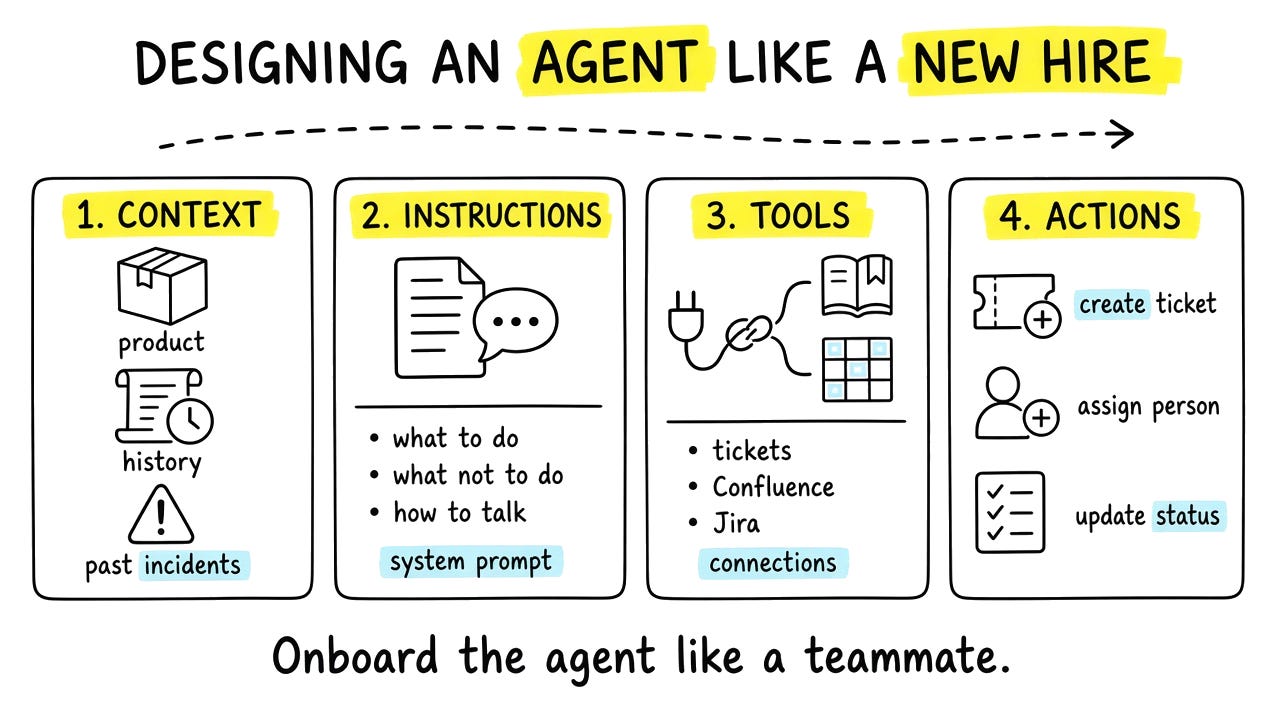
Take customer support as a concrete case. A customer has a complaint and wants it resolved. After you validate that an agent helps, you give it context about the product and past issues. You write instructions for how to handle a claim. You connect it to the complaint system, Confluence, maybe Jira. You allow actions such as create a ticket and assign a team. Suddenly the theory becomes a workflow people can picture.
The hard part is rarely the model. Data scientists and engineers know that stack. The hard part is adoption. People say their work is too unique to automate. So I look for the step that burns the most time and feels the worst. In support, that might be writing the PDF summary for the client. I start there. Once they see the agent work, they ask for the next piece: route the ticket, suggest a fix from history, catch the bug before the complaint arrives.
There’s also a collaboration layer with developers. Technical choices need business translation. Memory is a good example. Short-term memory inside a session. Long-term memory across sessions. You don’t ask users “which memory architecture do you want?” You ask business questions with the engineering team: should the agent remember this conversation, this customer, this preference next week? Then you translate together. A goldfish that forgets the topic mid-chat is a bad product. Feedback that never sticks is also a bad product. You decide with imperfect information, then you watch monitoring after launch.
One principle I keep repeating: invest in evaluation and monitoring early. Models and frameworks change fast. A first agent build can go stale. A solid eval suite and monitoring setup stay useful much longer. They become the durable specifications of the system.
I also use AI on my own PM work. Prototype the agent before writing a long spec. Use Claude or Claude Code so users can react to something real. Share the pattern with other PMs through workshops and demos. Part of the job is internal coaching now. That sits next to delivery, not instead of it.
Keep in mind:
Keep discovery and problem definition as the front door. Say no when a script is enough.
Design AI agents like new hires: context, instructions, tools, actions.
Start adoption on the most painful step, not the full workflow.
Translate technical choices into business questions with your engineers.
Invest early in evals and monitoring. They outlast the first model.
How do I talk about AI with leadership now?
Before, AI felt opaque. You had to sell usefulness. Fraud detection is a good example. The models had names nobody outside the team could picture. Machine learning felt like math, not something you could touch. Today leadership has ChatGPT in their pocket. They felt the experience. They see the potential. They listen faster.
They also expect magic. Overnight 100x productivity. That rarely arrives overnight, because humans and messy processes stay in the loop. Still, they are not wrong about the direction. The productivity gain can be huge. If you ignore AI while competitors use it, you lose ground.
One of my professors at engineering school told us something I still remember more than almost anything else from those years:
Put an information system on a broken process and you get more chaos.
AI makes that worse.
So the work with leadership is pedagogy, metrics, and incentives. First define the process and the target. Then pick measures that show real adoption and real outcomes. If you only track lines of code generated by AI, you will get lines of code. You may not get value for users. And plan for both ends of the room: the people who are already excited, and the people who resist. Same product. Different coaching.
Keep in mind:
Leadership understands AI better now because they use it themselves.
Ambition is fair. Instant magic is not. Stay honest about timelines.
Fix or clarify the process before you drop an agent on top of chaos.
Choose metrics that reward outcomes, not vanity volume.
Coach both enthusiasts and skeptics. Adoption is part of the product.
How does AI change a PM’s week?
AI did not shrink my week. It expanded the scope. Before, a lot of the job was specs, tickets, refinements, waiting on someone’s backlog. Now I can prototype, pull insights with AI-generated SQL, and show a working demo instead of waiting months for a budget committee. What used to take three months can take one or two weeks. Less dependence on other people’s queues. More ability to take an idea, ship an approximate version, and learn in production.
The time mix flipped. I used to spend something like 80% of my time on execution artifacts: specs, meeting notes, ticket grooming. With good automation, that can flip toward 80% on vision, strategy, and user insight. I insist on time with customers. Talking to them, collecting insights, adjusting the product. That part stays human, and it is still the most fun part of the job.
I also spend more time managing the AI systems I built to do the work I don’t like. A lot of that sits in Claude Code skills and workflows. I delegate, then I maintain. I share feedback. I fix the mistakes so they don’t repeat next time. It never ends. Some days I feel less like a classic PM and more like a manager of AI teammates.
If you’re a PM who doesn’t want an “AI PM” title, this still applies. AI will land on your roadmap. AI will land in your personal toolkit. The craft is the same: judgment, discovery, and shipping something people actually use.
Keep in mind:
AI expands what you can ship alone before a committee.
Push more time toward vision, strategy, and customer conversations.
Protect real user time. That is still the highest-leverage PM work.
Expect a new chore: managing and correcting the AI systems you create.
You don’t need the title to practice the craft.
What can you do this week if you feel behind?
You’re not alone. The field moves so fast that everyone feels behind by default. Starting now still puts you ahead of most people who only skim headlines.
Watch people work, not talk. A strong place to start is How I AI. Guests share their screen. Watch a few episodes. Sometimes what you see doesn’t make sense in the moment. Weeks later, it clicks. Screen-sharing beats theory every time.
If you barely use AI yet, start with one painful habit: meetings. PMs live in meetings. You gather information, align people, decide next steps. When that information stays trapped in a call, the week leaks. Transcripts fix the leak. Then AI can turn the transcript into work.
Three levels, from simple to powerful:
Capture. Paste the transcript into Claude, ChatGPT, or Gemini. Ask for a clean recap: decisions, owners, open questions. Nothing gets lost when the next meeting starts.
Draft the follow-through. In the same chat, ask for the artifacts: a Jira ticket with acceptance criteria, a Slack update, a short note to stakeholders. You still edit. You stop staring at a blank page.
Finish in the thread. Stay in that conversation until the actions are done. Create the ticket. Send the message. End with “what next?” and keep going until you have something shipped today, not a recap nobody reads.
That’s your personal-productivity door. Pair it with one roadmap experiment the same week. One feature, one AI agent sketch, one prototype in front of a user. Two loops, one week. That’s how you build an AI-native practice.
Keep in mind:
Feeling late is normal. Starting this week still matters.
Learn by watching real screens, not only reading takes.
Meetings are a high-ROI first use case because so much knowledge dies there.
Climb the three levels: capture, draft, finish.
Pair one personal AI loop with one product experiment every week.
Keep the conversation going
This is new for The AI Thinker: I’ve opened Substack Chat for subscribers. If anything I wrote left you with a question, if you’re still stuck on your own path into AI, or if you just want a hand thinking it through, jump in. No filter needed. I’m there, and I’d love to keep talking with you.
This week: pick one painful meeting habit and put AI on it, share one experiment with your team, and leave a trail of what you learned. That’s how you become more AI-native without waiting for a new title.